Blog

  • Custom Scheduler vs n8n: Which One Should You Choose for Automation?

    Custom Scheduler vs n8n: Which One Should You Choose for Automation?

    Businesses need schedulers to:

    • Automate routine processes and reduce human intervention.
    • Improve task execution efficiency and consistency.
    • Ensure tasks run on time, whether at fixed intervals or based on events.
    • Integrate with other applications for seamless workflow automation.

    When considering a scheduler, companies often choose between building a custom scheduler tailored to their needs or using an off-the-shelf solution like n8n, an open-source workflow automation tool. In this blog, we will compare these two approaches and help you decide which one is best for your use case.

    What is a Custom Scheduler?

    A custom scheduler is an in-house solution designed to execute jobs at specific intervals based on unique business requirements. Unlike pre-built schedulers such as n8n, which provide a visual, workflow-based automation tool, a custom scheduler offers full control over execution logic, optimization, security, and scalability. While it requires more development effort, it ensures precise alignment with business workflows and infrastructure.

    Common Technologies Used:

    • Python: Celery, APScheduler, Schedule
    • Node.js: Agenda.js, BullMQ
    • Linux: Cron Jobs

    Key Characteristics:

    • Tailored Execution: Built for specific business needs. Tailored execution logic for complex workflows.
    • Complete Control: Full control over job scheduling, resource allocation, and optimizations.
    • Integration Flexibility: Can be designed to work with any system.
    • Reliability & Error Handling: Robust error handling and failover mechanisms.
    • Requires Maintenance: Ongoing support for scaling, monitoring, and debugging.
    • Development Effort: Needs a dedicated development team.

    What is n8n?

    n8n is an open-source workflow automation tool that provides an intuitive, drag-and-drop interface for building automated workflows, including scheduling tasks without extensive coding.

    Key Features:

    • Visual Workflow Builder: No-code, easy-to-use UI for workflow creation.
    • Pre-Built Integrations: Supports 400+ integration tools, e.g., Google Sheets, Slack, email, APIs, and more.
    • Self-Hosting & Cloud Deployment: Offers flexibility in deployment options.
    • Scalability & Monitoring: In-built logging and error handling.
    • Less Customization: Limited flexibility compared to fully custom solutions.
    • Dependency on Third-Party Support: Requires updates from the n8n community or paid enterprise support.

    Feature Comparison: Custom Scheduler vs. n8n

    FeatureCustom Schedulern8n
    Development EffortHigh (requires coding)Low (drag-and-drop)
    FlexibilityVery HighModerate
    MaintenanceRequires ongoing supportManaged by n8n/cloud
    IntegrationsCustom-built integrationsPre-built integrations
    ScalabilityHigh (depends on infra)Scalable but limited
    Security ControlComplete controlLimited to n8n settings
    MonitoringRequires custom setupBuilt-in logging & alerts
    SimplicityScripting based Visual workflow automation
    Best forDevelopers, custom logicBusiness users, quick automation

    Best Use Cases for Each

    Use a custom scheduler if:

    • You have highly specific, complex scheduling needs.
    • You need full control over execution, optimization, and security.
    • You have a dedicated development team to maintain it.
    • You require deep integration with your existing infrastructure.

    Use n8n if:

    • Enrich leads automatically—Connect form builders such as Jotform, Typeform, or HubSpot with contact verification services.
    • Limitless CRM integration— Transfer your leads to any tool like Pipedrive, Salesforce, or HubSpot.
    • Set up automated actions—trigger specific actions when events occur (e.g., lead status changes, customer purchases).
    • Minimize risk, maximize protection—eliminate IT errors to ensure infrastructure stability and reliability.
    • Custom data integration—Integrate with any API or database to pull data from legacy or niche systems.
    • Automated data enrichment—Fetch additional information via APIs and databases to enhance CRM data.
    • Advanced lead scoring and routing—Integrate with machine learning models for intelligent lead scoring and routing.
    • Custom notifications and alerts—Set up custom alerts across channels (email, SMS, Slack) triggered by specific conditions.
    • Automated personalization with AI—Use AI to segment customers and automate personalized marketing communications.

    Conclusion: Which One Is Right for You?

    Choosing between a custom scheduler and n8n depends on your business needs and resources.

    • If you require full control and deep customization and have the resources to build and maintain a scheduler, a custom solution is the best choice.
    • If you want quick automation, pre-built integrations, and a low-code approach, n8n is a great option.

    For businesses looking to scale rapidly with minimal development effort, n8n is the way to go. However, if you need a highly customized and optimized scheduling system, investing in a custom scheduler will pay off in the long run.

    Final Thought: If your priority is speed and ease of setup, choose n8n. If you need custom logic, security, and scalability, go with a custom scheduler.


  • Pros and Cons of Custom Web Design vs. Template Web Design

    Pros and Cons of Custom Web Design vs. Template Web Design

    The decision between a template and a custom web design is based on your budget, schedule, and business objectives. Custom web designs are tailored to your brand, offering enhanced scalability, security, and long-term growth flexibility. In contrast, templates enable rapid, low-cost launches with basic features.

    Template Web Design:

    Pros:

    • Budget-Friendly: Templates are affordable, particularly for new and small enterprises. You don’t have to spend a lot of money on design and development to launch a respectable-looking website.
    • Ready to Launch: Just add content and make minor adjustments before launching the templates. They are therefore perfect for companies seeking a rapid online presence.
    • Requires Minimal IT Help: You can avoid hiring developers by using drag-and-drop builders and easy customization tools, which allow anyone with rudimentary computer skills to set up a website.
    • Reliable Updates: To keep your website operating smoothly, designers frequently update templates to stay compatible with the newest web standards and technologies.
    • Wide Range of Options: Whether you’re a blogger, restaurant owner, or retailer, there’s probably a theme that will work for you among the hundreds of themes available for various industries.
    • User-Friendly Plugins: The majority of templates allow for the addition of practical features without knowing any code, thanks to support for well-known plugins like image sliders, social media feeds, and contact forms.
    • Third-Party App Integration: To help you manage your business efficiently, templates typically offer built-in integration with necessary apps like analytics, email marketing tools, and payment gateways.
    • Clear Structural Layout: Templates offer an organized framework that makes it simpler to edit and arrange your content by assisting you in visualizing how your website will appear.
    Template Web Design

    Cons:

    • Lack of Uniqueness: Your website may resemble that of others, as numerous companies utilize the same templates, thereby making it difficult to distinguish oneself in a competitive market.
    • Limited Customization: If the template has locked features, you might not be able to modify certain components, such as layout or functionality, to meet your precise requirements.
    • Limited Functionality: You might not be able to provide distinctive user experiences if you don’t support advanced features like product filtering or custom booking systems.
    • Security Issues: Many templates rely on third-party plugins that may not receive regular updates, which can leave your website vulnerable to malware or hacking attempts.
    • Not Always Friendly to SEO: Some templates contain poorly organized or bloated code, which can lower the visibility and ranking of your website in search results.
    • May Not Be Fully Mobile-Responsive: Poor user experiences and increased bounce rates on mobile devices may result from templates that don’t adapt well to smartphones and tablets.
    • Limited Support: If the template is free or was created by a small team without a dedicated help desk, you might have trouble getting technical support.
    • Lacks Professional Feel: Custom-built websites may appear more polished and brand-aligned than template-based ones, which may affect how people view your company.

    Custom Web Design:

    Pros:

    • Unique and Branded Design: Your website is created from the ground up to reflect the essence of your business, giving you a genuinely unique appearance and feel that makes you stand out.
    • Flexible and Adaptable: All aspects of the website, including features and layout, are completely customizable. This makes sure your website works the way you want it to.
    • Tailored to Business Needs: Whether you require particular user journeys, integrations, or performance enhancements, custom websites are constructed around your objectives.
    • Improved User Experience: By streamlining the user journey for your audience, you can make the website quick, easy, and pleasurable, which will increase engagement and conversions.
    • SEO-Friendly Architecture: Custom designs make use of SEO best practices and clean, optimized code, increasing the likelihood that your website will rank higher in search engine results.
    • Highly Customizable Features: Include intricate components made especially for your audience, such as interactive product catalogs, booking engines, or custom calculators.
    • Scalable for Growth: A specially designed website can readily expand to accommodate your company’s needs. You don’t have to start over when adding new features, sections, or integrations.
    • Increased Security: Custom websites are more secure and less hackable when developers limit third-party plugins and follow stricter coding techniques.
    Custom Web Design

    Cons:

    • Higher Development Costs: Compared to using templates, custom design necessitates a larger financial investment due to the involvement of designers and developers.
    • Needs a Skilled Team: Unlike do-it-yourself options, you will need a team of professionals to design, build, and maintain your website, which may require more resources.
    • Requires Constant Maintenance: As technology and user demands change, a custom website will require frequent updates to stay safe and operational.
    • Time-Intensive Process: Creating a custom website requires patience and time, typically ranging from weeks to months, from research and wireframing to testing and deployment.

    Conclusion:

    Your short- and long-term objectives should guide your decision between a template and a custom web design. Templates are a good place to start if you need a quick, inexpensive, and easy solution. However, if you want a digital presence that is highly professional, scalable, and brand-focused, investing in a custom-built website will provide the performance and flexibility your company deserves.

  • 10 AI Testing Tools to Streamline Your QA Process in 2025

    10 AI Testing Tools to Streamline Your QA Process in 2025

    In the ever-changing landscape of technology, ensuring software quality has become critical. AI testing technologies are transforming quality assurance (QA) operations by enhancing precision, speed, and efficiency. Here are eleven AI-powered testing solutions that can help streamline your QA process in 2025:

    1. Applitools

    Applitools offers advanced visual AI technology to perform visual regression testing as its core feature. The tool makes it possible to achieve a consistent user interface display that works on all hardware systems and browsers effortlessly.

    2. Testim

    Testim uses machine learning technology for creating and maintaining automated test scripts. The tool provides automatic fix capabilities that suit agile development teams.

    3. Mabl

    Mabl operates as a full testing solution that employs AI systems to detect and resolve bugs during end-to-end test automation.

    4. Functionize

    Using AI, this tool makes the process of test creation and maintenance more straightforward. The system provides excellent scaling capabilities, together with features that allow the testing of intricate applications.

    5. Eggplant

    The AI and predictive analytics system in Eggplant helps deliver automated tests for functional and performance testing to improve user usability.

    Testing Tools

    6. Selenium AI Plugins

    AI-powered plugins that work with traditional Selenium testing methods enhance the quality of test scripts by improving their adaptability and reducing occurrences of false negative testing results.

    7. Katalon Studio

    Katalon functions as an all-in-one testing platform because it combines AI technologies to manage web, mobile, and API testing in a single environment.

    8. AI Testbot by QMetry

    Intelligent test execution alongside test analysis is provided by this tool because AI algorithms identify priority-based critical test cases.

    9. Tricentis Tosca

    The AI-based, model-based testing of Tricentis Tosca accelerates software delivery without affecting the overall software quality.

    10. Test.ai

    Test.ai provides disruptive testing software that lets users create automated tests for user interface and functional systems that duplicate human input exactly.

    How AI Tools Benefit QA Teams

    • Faster Test Execution: Test-running operations become shorter with the assistance of AI tools.
    • Improved Accuracy: The identification of concealed bugs and inconsistencies happens through machine learning algorithms.
    • Cost-Effectiveness: The automation of repetitive work results in decreased human labor and cost reduction.
    • Scalability: Multiple environments become accessible to AI testing tools, which streamline the process of implementing large-scale deployments.

    Conclusion:

    The implementation of AI testing tools transforms your QA operation to excel in software testing with an accelerated pace and better accuracy at reduced expenses. The organizational integration of these tools for 2025 will position your company as a competitive force in the tech field. Ellocent Labs supplies innovative solutions that enhance the development lifecycle for your software systems. Our team supports you in finding excellence in quality assurance services.

    Contact us today to explore AI-driven QA solutions.

  • How Did We Go From Chatbots to AI Agents?

    How Did We Go From Chatbots to AI Agents?

    Modern conversational technology experienced a deep technological progression through time, beginning with rule-based chatbots and resulting in advanced AI agents for contemporary use. Artificial systems that used to handle specific keywords have developed into user-friendly adaptive platforms that mimic human conversation abilities. The development of natural language processing and machine learning and deep learning techniques allowed chatbots to progress into context-holding, AI-driven agents able to learn autonomously and execute difficult operations that restructure digital human-machine interactions.

    Let’s examine this evolution in more detail and see how each stage influenced today’s sophisticated systems.

    The Era of Basic Chatbots

    Basic chatbots provided rule-based systems because they needed instructions to process specific keywords in the early 2000s. These bots could:

    • Standard procedures programmed within the system respond to frequent questions that users pose.
    • Operate within predefined workflows
    • Although it was challenging to deal with complex inquiries, the system operated successfully.

    The bots from that period signaled important progress while their artificial intelligence capability remained restricted. The bots functioned with preloaded automated replies, which predefined the exchanges between the system and users.

    The Integration of Natural Language Processing (NLP)

    Information technology advanced with the introduction of NLP as a functionality that let chatbots perform the following operations:

    • Understand context and intent
    • Process language more naturally
    • Deliver more human-like interactions

    The combination of IBM Watson and early versions of Siri enabled NLP technologies to power chatbots, which provided users with interactive responses. The advancement enabled better user-exchange interactions through progress.

    The Role of Machine Learning

    The integration of machine learning technology has brought chatbots an ability to adapt through the following features:

    • Learn from past interactions
    • Improve accuracy over time
    • Bots can determine upcoming customer requirements through observed behavioral patterns.

    Bots entered their new stage of development when they moved from simple reactive systems to practical proactive tools. The platform began delivering individual recommendations on top of helping users solve complicated problems.

    The Rise of AI Chatbots

    AI chatbots established themselves as intermediaries that connect standard chatbots with complex AI agents. These systems utilize natural language understanding, machine learning, and real-time data analysis to:

    • Personalized interactions should be available through all user contacts
    • The platform should easily link with both customer support management solutions and Customer Relationship Management systems
    • Semi-complex inquiries become manageable through minimal assistance from human operators

    A new milestone appeared through this technology, which created responsive conversations that dynamically communicated while minimizing programmed responses and adjusting to user aims. The public gained access to artificial intelligence chatbot functionality through main platforms including ChatGPT, Google Assistant, and Alexa, which enhanced accessibility for businesses and their audiences.

    Enter AI Agents: The Game-Changer

    AI agents offer features that extend classic chatbot functionalities through their

    • Advanced AI Models: Leveraging deep learning and generative AI
    • The computer shows multichannel intelligence through its ability to decode text material alongside both vocal statements and visual data from cameras.
    • After the independent system task reception, the operation can continue without human intervention.

    Unlike chatbots, AI agents can:

    • The system engages in meaningful dialogue about various subject topics
    • The system executes complex operations, which include appointment booking together with schedule control.
    • The system continues operating undisturbed while linked with IoT devices together with enterprise operations.

    OpenAI’s ChatGPT provides an illustration alongside Google’s Bard and Amelia from business applications.

    What’s Driving This Evolution?

    • Advancements in AI: Improved algorithms and computational power
    • User Expectations: Users desire human-like interactive patterns when they interact with systems.
    • Business Needs: Business operations at present demand automated solutions that provide high efficiency together with effective scalability.

    The Future of AI Agents

    AI agents will develop the following system profile during the next years:

    • More Context-Aware: Gaining insight into the subtle preferences of users.
    • Emotionally Intelligent: Responding with empathy and adaptability
    • Fully Integrated: Becoming indispensable parts of daily life, from homes to workplaces

    Final Thoughts

    The advancement of technology, together with human interest in intelligent computer systems, produced AI agents beginning with chatbots. Businesses using AI agents gain a competitive position and create better user experiences. Ellocent Labs takes a leadership position in the development of these innovative solutions for the current period. Our team at Ellocent Labs operates among the leaders of current advancements. Build AI solutions that serve your requirements!

    Contact us today to explore the possibilities.

  • Agile: Understanding The Core Principles of Agile Methodology

    Agile: Understanding The Core Principles of Agile Methodology

    The term “Agile” is widespread in the domain of project management, but what does it mean? This goes more beyond a single term. It signals a holistic change in a project approach towards more collaboration, improvement, and flexibility as the central characteristics. In this blog post, we explore the Agile core processes for its structures, pillars and methodologies to give complete insights into its world.

    What is AGILE?

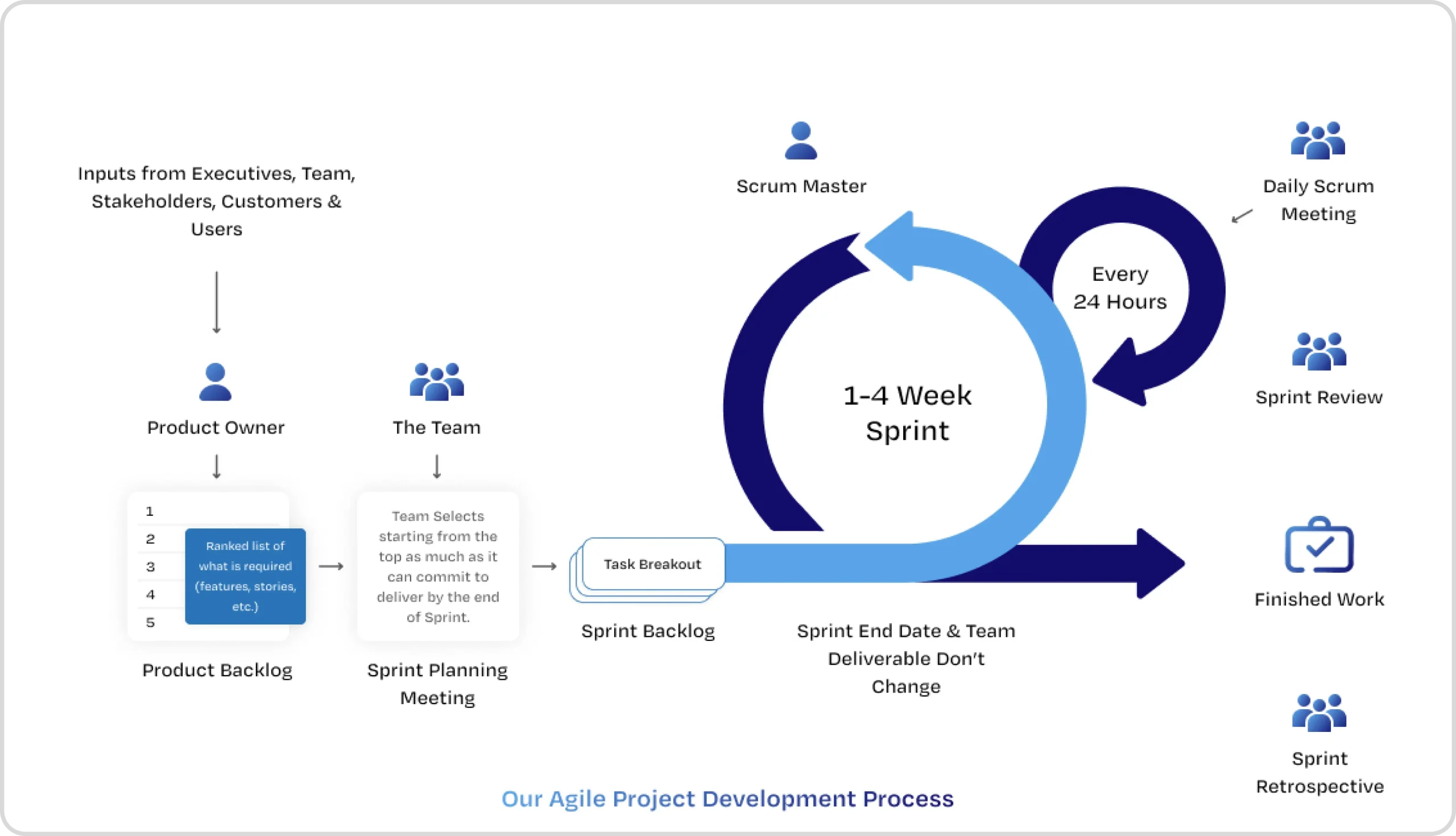
    Agile Methodology is an iterative and incremental approach to project management and software development with an emphasis on getting value out to customers quickly, incorporating feedback quickly as well as changing as needed. Agile is adaptive to changes as they come with no rigid structures and sequences. These approaches are critical in modern-day fast changing environments where there are near constant changes and competition.

    Core Principles of Agile

    Four primary values and twelve principles core to the methodology are stated in the Agile manifesto. Among them, the following are the most salient. Agile teams are guided by these principles towards the decisions that they make and the actions they take.

    1. Customer Focus: Agile places great emphasis in understanding customer needs while creating a product and making sure feedback is received during the project so that the ultimate end goal can be met.
    2. Embrace Change: With Agile, requirements and policies can change at any time and being adaptable to these changes is particularly useful in this age of fast moving business environments.
    3. Fast and Frequent Delivery: The Agile Methodology breaks down the process of development into components and instead of planning for a full-fledged system, they prefer iteratively building working software through cycles called sprints. This enables for much-needed feedback very early in the process while also lowering the chances of constructing something unwanted.
    4. Collaboration: The development team, customers, and stakeholders are always on the same page and in close collaboration that allows them to jointly achieve the desired goals and objectives. Complete communication and understanding serve as foundational principles.
    5. Continuous Improvement: It facilitates self improvement across teams and processes. Teams have the ability and permission to identify issues, reflect, and change processes accordingly. When done properly, this always leads to improvement in both quality and productivity.
    6. Team Respect: Agile provides team members with trust and power as it values self-organization. This delegation of responsibility helps create a friendly and efficient atmosphere.

    Agile Process:

    A general Agile framework is very simple and encompasses planning, sprints/iterations, testing, and maintenance, while specific frameworks like Scrum and Kanban have their own particular processes:

    1. Planning: Set the broad goals and create a product roadmap which essentially is a living document that is updated constantly as new tasks are identified. All the features that need to be implemented are sorted by priority in the product backlog.
    2. Sprints/Iterations: Work on the identified tasks in short cycles (e.g., 2 weeks) to work on specific features of the product that are defined in the project backlog. By the end of the two weeks, the goal of the sprint should be met and a working version of the software increment should be put out.
    3. Daily stand-ups: Short daily meetings for the team to align efforts, know of any issues, and devise a plan for the day. These meetings are aimed at encouraging engagement and openness.
    4. Review: At the end of each sprint, the team displays its working demo to the client and collects their feedback which is then used to improve the product backlog and decide the next sprint’s plan.
    5. Retrospective: During this phase, the team analyzes the sprint and finds out how they did in terms of the process and their interactions. This approach is what makes Agile work, a cycle of continuous improvement.

    Key Pillars of Agile

    Three key pillars support the Agile principles and process:

    1. Transparency: No single person has control over the project, and a shared responsibility for the success or failure of a project results in open communication and visibility into the progress of the project.
    2. Inspection: Regular inspection of the work being done and its processes in order to discover problems and solve them proactively. This can be applied to the product increment, the activities of the team, and the project’s progress.
    3. Adaptation: Response to feedback ideas is also one of the principles of Agile. Changes have to be made after inspection of the feedback concerning the product, the team and project processes, and the project as a whole.

    What has led to the popularity of agile?

    Agile is popular today because it solves modern project management problems. Customer centricity, flexibility and improvement enables Agile to effectively manage complicated projects in an ever changing world. Agile allows managing complex projects in a complex world. Teams are able to deliver value in record time, eliminate unnecessary steps, and in the end, produce better goods. Agile allows teams to embrace change, foster collaboration, and mitigates uncertainty to ensure positive outcomes. Agile surely makes projects a lot more efficient.

    Your vision, our skills. Let’s build your dream product together. Ellocent Labs – Agile development you can trust. Reach Us Today!

  • Revolutionizing Aviation Data: Reaching New Heights With Cloud-Native

    Revolutionizing Aviation Data: Reaching New Heights With Cloud-Native

    The aviation industry thrives on precise and efficient data processing. With ever-increasing data volumes from diverse sources, robust solutions are essential. Our recent project tackled the challenge of processing up to 1000 GB of data daily from multiple APIs. Faced with high server costs and performance bottlenecks, we embarked on a transformative journey using cloud-native technologies. This blog post details how we achieved a 50% cost reduction and significantly improved performance.

    The Challenge: High Costs and Inefficiencies in Data Processing

    Our initial setup involved running dedicated servers 24/7, resulting in a substantial monthly expense of $11,000 USD. This always-on approach proved inefficient, especially during periods of lower data volume. Furthermore, the time required to fetch and process data impacted application responsiveness and overall efficiency. Managing scalability was another major concern, as fluctuating data volumes required a more dynamic solution.

    Exorbitant Server Costs: The 24/7 operation of dedicated servers resulted in a substantial monthly expenditure of $11,000, creating a significant financial burden on the organization. This high cost significantly impacted the overall project budget and profitability.
    Performance Bottlenecks: The time required to fetch and process large volumes of data from multiple APIs introduced noticeable delays in application performance. This sluggishness negatively impacted user experience, leading to frustration and potentially hindering business operations.

    Scalability Limitations: The existing infrastructure lacked the flexibility to dynamically scale resources in response to fluctuating data volumes and user demands. This inflexibility hindered the system’s ability to handle peak loads effectively, potentially leading to performance degradation, data processing delays, and even service outages.

    Our Innovative Solution: Embracing Cloud-Native Technologies

    We adopted a developer-centric strategy, leveraging the power of cloud-native technologies to address our challenges:

    Containerization with Docker: By containerizing our applications with Docker, we ensured consistency across environments, from local development to production. This approach eliminated environment-related discrepancies and significantly streamlined our deployment pipeline, making it more reliable and efficient.

    Kubernetes Orchestration: Kubernetes became the backbone of our infrastructure, automating scaling, workload management, and application deployments. This orchestration platform significantly improved productivity by automating tasks that were previously manual and time-consuming.

    Serverless Computing with AWS Lambda: By leveraging AWS Lambda, we transitioned to an on-demand server management model. This eliminated idle runtime and drastically reduced costs by only paying for compute time when our functions were actively processing data.

    Real-time Monitoring with the ELK Stack: Implementing the ELK (Elasticsearch, Logstash, Kibana) stack provided us with real-time monitoring and logging capabilities. This enhanced our understanding of application performance, resource utilization, and allowed us to proactively identify and address potential issues.

    The Results: Significant Cost Savings and Performance Gains

    Our cloud-native approach delivered remarkable results:

    50% Cost Reduction: The on-demand nature of AWS Lambda dramatically lowered our monthly expenses, achieving our target of a 50% reduction. This represents a significant saving that can be reinvested in other areas of the business.

    Increased Efficiency and Faster Deployments: Containerization and Kubernetes streamlined our deployment pipeline, enabling faster releases and improved overall efficiency. This agility allowed us to respond more quickly to changing business needs.

    Proactive Monitoring and Improved Stability: The ELK stack provided valuable insights into application behavior, allowing us to proactively identify and address potential issues before they impacted users. This proactive approach significantly improved application stability and reliability.

    Dynamic Scalability and Resource Optimization: Kubernetes ensured seamless application scaling without manual intervention. This dynamic scalability allowed us to efficiently handle fluctuating data volumes and optimize resource utilization.

    Conclusion

    By adopting containerization, Kubernetes, serverless computing with AWS Lambda, and strong monitoring with the ELK stack, we created a highly scalable, cost-efficient, and high-performance platform for aviation data processing. Not only did this solution optimize performance and save costs, but it also laid a strong foundation for future innovation in data management.

    If your organization is also struggling with such similar problems of high infrastructure expenses, performance bottlenecks, and scalability, we strongly advise you to consider the implementation of cloud-native technologies. They provide an effective means to achieve considerable cost savings, enhance performance, and fuel innovation.

  • Revolutionizing SaaS Scalability: Automating Multi-Client Onboarding Solution With a Single Codebase

    Revolutionizing SaaS Scalability: Automating Multi-Client Onboarding Solution With a Single Codebase

    Managing a multi-client SaaS application can be challenging, especially when onboarding new businesses involves repetitive manual tasks like setting up custom domains, configuring Amazon Cognito user pools, creating email templates, and provisioning storage. As the number of clients grows, this manual process becomes time-consuming, error-prone, and difficult to scale.

    To streamline and simplify the onboarding process, we offer a powerful solution. By leveraging CloudFormation templates, you can dynamically automate the setup of resources required for each new business, ensuring consistency, reducing manual effort, and accelerating client onboarding.

    Let’s explore how to create reusable templates that make your SaaS platform scalable, efficient, and future-ready.

    Challenges Faced in Traditional SaaS Client Onboarding

    Onboarding new clients to a SaaS platform is often a manual and error-prone process that can create significant challenges. Companies encounter these hurdles during traditional client onboarding:

    Time-Consuming Setup: Each new client requires custom configurations for domains, user pools, email templates, and storage. These tasks are repetitive and time-consuming, especially as the number of clients increases, leading to delays and operational bottlenecks. Clients expect quick setup times and fast time-to-value. Manual onboarding processes slow down the process, delaying the point at which clients can start using the service effectively. This can lead to dissatisfaction and a higher churn rate.

    Manual Configuration Errors: The more manual steps involved in onboarding, the greater the chance of mistakes. Variations in setup lead to unpredictable behavior, making it difficult to troubleshoot and maintain a consistent service level.

    Inconsistent Client Experiences: Without an automated process, each client onboarding can vary in terms of configurations and settings. This lack of consistency can lead to unpredictable behavior, challenges in troubleshooting, and difficulties in scaling the platform effectively.

    Scalability Issues: As the number of clients grows, managing manual onboarding becomes increasingly difficult. It becomes harder to ensure that each new client receives the necessary resources in a consistent and efficient manner, leading to slower growth and higher operational costs.

    Resource Management Challenges: Allocating and managing resources like storage and Cognito user pools can become overwhelming as the client base grows. Ensuring each client gets the correct allocation of resources.

    Our Innovative Solution: Automating Client Onboarding with One Click

    Our solution streamlines the entire client onboarding process by automating tasks like domain configuration, Amazon Cognito user pool setup, email template creation, and storage provisioning—all with a single click. This eliminates manual effort, reduces errors, and ensures consistency across all clients, leading to faster and more reliable onboarding.

    With automation in place, resource allocation is optimized, ensuring each client receives the correct resources without over-provisioning or under-provisioning. This solution also enhances scalability, allowing your platform to grow effortlessly without delays. By securely provisioning client data and ensuring compliance, we address security concerns and reduce risks, enabling clients to get up and running quickly with minimal friction and maximum efficiency.

    Our Approach to Success:

    To bring our innovative solution to life, we focused on creating a streamlined and automated onboarding process that could handle every aspect of client setup efficiently. Here’s how we achieved it:

    Centralized Automation Platform:

    We developed a centralized platform that integrates all necessary services like custom domain management, Cognito user pool configurations, email template creation, and storage provisioning. This platform ensures that every client’s resources are set up automatically and consistently with minimal manual intervention.

    Predefined Templates for Resource Allocation:

    We have designed reusable templates that define the configurations for each client’s domain, user pool, and storage. These templates are automatically applied during the onboarding process, ensuring that every client receives a consistent, high-quality setup. Once the domain and Cognito user pool are successfully created using the templates on the server, we store the Cognito details and domain configurations in the database for each business subscription.

    Efficient Multi-Client Database Management:

    By managing multiple clients within a single database, we can streamline data handling, improve performance, and reduce operational overhead. This solution leverages advanced data partitioning and access control techniques to isolate each client’s data, ensuring security and preventing cross-client data access. As a result, clients enjoy the benefits of a dedicated database experience without the complexity and cost of maintaining separate databases for each one.

    Security and Compliance Best Practices:

    Security was a top priority in our solution. We implemented automated access controls and resource isolation for each client, ensuring that their data is secure and compliant with industry standards. This automated setup reduces the risks associated with manual configurations and ensures that security is maintained consistently.

    User-Friendly Interface:

    We designed an intuitive, user-friendly interface that allows platform administrators to trigger the entire onboarding process with a single click. The interface provides transparency, showing the status of the setup and any required actions, making it easy for administrators to track and manage the onboarding process.

    By combining automation, scalability, and security, we created a solution that addresses the key challenges of traditional onboarding, reducing manual effort, increasing efficiency, and ensuring a consistent, secure client experience.

    Conclusion

    By automating the onboarding process, we’ve helped SaaS businesses:

    • Reduce time-to-market: Onboard new clients faster and get them up and running more quickly.
    • Improve client satisfaction: Deliver a consistent and reliable service experience.
    • Increase operational efficiency: Free up valuable resources for other critical tasks.
    • Gain a competitive edge: Scale your business with confidence and accelerate your growth.

    Ready to transform your SaaS business? Let’s innovate together!

  • Top IT Monitoring Tools: Site 24X7, Prometheus, Grafana and Nagios Compared

    Top IT Monitoring Tools: Site 24X7, Prometheus, Grafana and Nagios Compared

    Site 24×7 is a cloud-based IT monitoring, alerting, and reporting solution for IT teams and DevOps. It offers support for a variety of verticals, including:

    Server monitoring, Cloud monitoring, Network monitoring, Application monitoring, Real user monitoring, Website monitoring.

    Site 24×7 offers both free and paid monitoring services for an entire IT environment. It can remotely monitor websites and alert users if a website goes down. It also provides weekly reports on the performance of monitored websites.

    Site 24×7 is a product of Zoho Corp., which was previously known as AdventNet Inc.. It has integrated data centers in the US, European Union, India, China, Australia, and Japan

    Promethus:

    Prometheus Monitoring is a free, open-source tool that monitors computer systems and applications. It collects and stores system performance data in a time-series database. This data can be used to identify and diagnose problems, set up alerts, and optimize systems

    Prometheus is particularly useful for monitoring Kubernetes clusters. It can also be used to monitor applications, microservices, and networks, including service meshes and proxies.

    Prometheus has several advantages, including: 

    Service discovery: Prometheus is integrated with Kubernetes and can find all services and pull metrics from Prometheus endpoints.

    Always works: Prometheus continues to work even if other parts of the infrastructure are broken.

    Fast outage discovery: Prometheus allows for fast outage discovery.
    No extensive setup: Prometheus doesn’t require extensive setup.

    Prometheus is well suited for working with time series data and drawing insights from it. It’s also one of the best tools for monitoring running databases.

    Prometheus collects metrics, individual identifiers, and timestamps. It has four primary metric types: counters, gauges, histograms, and summaries. These metric types are found in Prometheus’ official client libraries: Go, Java, Ruby, and Python. 

    Prometheus exposes data using a simple format, with a new line for each metric, separated with line feed characters

    Grafana:

    Grafana is a free, open-source, interactive data visualization platform that allows users to see their data through charts and graphs. It is often used in DevOps environments to visualize and analyze data from various sources.

    Grafana allows users to:

    Query, visualize, alert on, and explore metrics, logs, and traces
    Turn time-series database (TSDB) data into graphs and visualizations
    Unify data into one dashboard for easier interpretation and understanding

    Nagios:

    Nagios is a free, open-source software application that monitors systems, networks, and infrastructure. It’s a legacy IT infrastructure monitoring tool that focuses on server, network, and application monitoring. 

    Nagios can help monitor systems, services, applications, and business processes in a DevOps environment. It performs rapid tests and is simple to configure on the client and server sides. 

    Nagios is designed to run on the Linux operating system and can monitor devices running Linux, Windows, and Unix OSes. It runs periodic checks on critical parameters of application, network, and server resources. 

    Nagios can also monitor an assortment of metrics on many different virtualization platforms, such as VMware, Microsoft Virtual PC, Xen, and Amazon EC2. 

    Some reasons to use Nagios include:

    • Comprehensive Monitoring – The monitoring platform integrates all server and network device and application and service data in a single management environment.
    • Flexible Alerting – The monitoring system enables users to set up alerts through email messages and SMS notifications and external third-party system integrations in case of problems.
    • Extensible Architecture – Nagios XI provides access to a collection of more than 1,000 plugins users can employ to track all types of systems or applications.
    • Historical Reporting – The platform collects performance data that organizations use for capacity planning along with trend analysis purposes.
    • Lightweight Design – System resources remain low but you gain complete monitoring visibility

    Detects all types of network or server issues
    Helps you to find the root cause of the problem
    Active monitoring of your entire infrastructure and business processes

    Conclusion: Choosing the Right IT Monitoring Tool for Your Needs

    • These monitoring solutions—Site 24×7, Prometheus, Grafana, and Nagios—fit different IT requirements and business needs individually.
    • Site 24×7 stands out by combining all its features in one cloud-based system, which provides extensive vertical support for businesses that require full real-time global monitoring services.
    • Prometheus stood out in the Kubernetes space because it delivers strong time-series data monitoring features suitable for DevOps teams.
    • Data visualization through Grafana provides teams with solutions for turning complicated metrics into effective dashboards that prioritize complex analytics needs alongside multi-source data combination.
    • Nagios functions as a trusted infrastructure management solution that best serves companies with on-site requirements or those wanting thorough network diagnostics.
  • Kubernetes Unraveled: Mastering Container Orchestration

    Kubernetes Unraveled: Mastering Container Orchestration

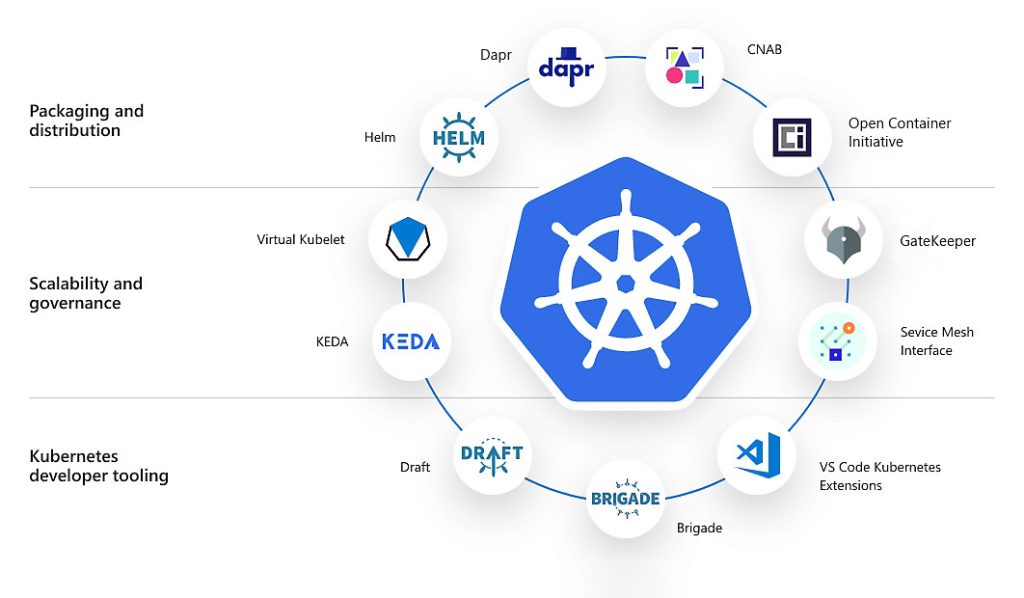
    XKubernetes is a portable, extensible, open source platform for managing containerized workloads and services, that facilitates both declarative configuration and automation. It has a large, rapidly growing ecosystem. Kubernetes services, support, and tools are widely available.

    Why you need Kubernetes and what it can do

    Containers are a good way to bundle and run your applications. In a production environment, you need to manage the containers that run the applications and ensure that there is no downtime. For example, if a container goes down, another container needs to start. Wouldn’t it be easier if this behavior was handled by a system?


    That’s how Kubernetes comes to the rescue! Kubernetes provides you with a framework to run distributed systems resiliently. It takes care of scaling and failover for your application, provides deployment patterns, and more. For example, Kubernetes can easily manage a canary deployment for your system.

    Kubernetes provides you with:

    • Service discovery and load balancing Kubernetes can expose a container using the DNS name or using their own IP address. If traffic to a container is high, Kubernetes is able to load balance and distribute the network traffic so that the deployment is stable.
    • Storage orchestration Kubernetes allows you to automatically mount a storage system of your choice, such as local storages, public cloud providers, and more.
    • Automated rollouts and rollbacks You can describe the desired state for your deployed containers using Kubernetes, and it can change the actual state to the desired state at a controlled rate. For example, you can automate Kubernetes to create new containers for your deployment, remove existing containers and adopt all their resources to the new container.
    • Automatic bin packing You provide Kubernetes with a cluster of nodes that it can use to run containerized tasks. You tell Kubernetes how much CPU and memory (RAM) each container needs. Kubernetes can fit containers onto your nodes to make the best use of your resources.
    • Self-healing Kubernetes restarts containers that fail, replaces containers, kills containers that don’t respond to your user-defined health check, and doesn’t advertise them to clients until they are ready to serve.
    • Secret and configuration management Kubernetes lets you store and manage sensitive information, such as passwords, OAuth tokens, and SSH keys. You can deploy and update secrets and application configuration without rebuilding your container images, and without exposing secrets in your stack configuration.

    Kubernetes Components

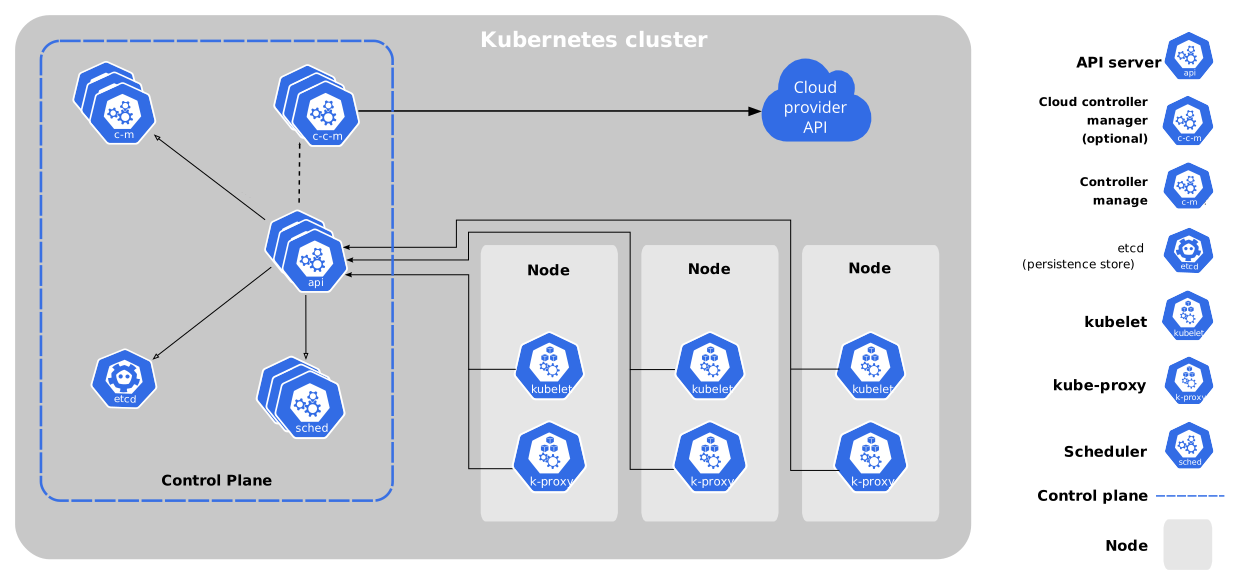
    When you deploy Kubernetes, you get a cluster.
    A Kubernetes cluster consists of a set of worker machines, called nodes, that run containerized applications. Every cluster has at least one worker node.
    The worker node(s) host the pods that are the components of the application workload. The control plane manages the worker nodes and the Pods in the cluster. In production environments, the control plane usually runs across multiple computers and a cluster usually runs multiple nodes, providing fault-tolerance and high availability.
    This document outlines the various components you need to have for a complete and working Kubernetes cluster.

    Advantages of Kubernetes:

    Scalability: Kubernetes allows developers to easily scale their applications up or down as demand fluctuates. The platform automatically monitors the health of each component of the application and can dynamically adjust the number of instances running based on the demand. One of the biggest advantages of Kubernetes is its ability to scale applications horizontally. Kubernetes can automatically scale the number of application instances based on the demand, making it an ideal platform for handling sudden spikes in traffic. This makes it easy to ensure that the application remains available and responsive to users.

    Resource efficiency: Kubernetes helps optimize the use of resources by scheduling containers to run on the most appropriate node based on their resource requirements. This ensures that resources are used efficiently, reducing the cost of running the application. Kubernetes can help organizations optimize resource utilization by intelligently scheduling and managing containers across nodes. This ensures that resources are used efficiently and reduces infrastructure costs.

    High availability: Kubernetes provides mechanisms for ensuring that applications are always available. For example, it can automatically restart containers that fail, and it can schedule replicas of containers across different nodes to ensure that the application can survive node failures. Kubernetes provides built-in features for ensuring high availability of applications. It automatically restarts failed containers, moves them to other nodes, and schedules them to run on healthy nodes. This ensures that the application is always available to users, even in the event of hardware failures.

    Portability: Kubernetes provides a consistent deployment platform across different environments, whether it is on-premises or in the cloud. This makes it easier for developers to deploy their applications in a variety of environments without having to modify their code. Kubernetes is designed to be cloud-agnostic, which means that it can run on any cloud provider or on-premises infrastructure. This allows organizations to avoid vendor lock-in and choose the platform that best meets their needs

    Self-healing: Kubernetes can detect and respond to failures in the application by automatically restarting containers, rolling back deployments, and rescheduling workloads. Kubernetes is designed to be self-healing. If a container crashes or becomes unresponsive, Kubernetes automatically detects the failure and restarts the container. This ensures that the application remains available and minimizes downtime.

    Service discovery and load balancing: Kubernetes provides a built-in service discovery and load balancing mechanism, which allows developers to easily expose their application services and manage traffic between them.

    Extensibility: Kubernetes is highly extensible, allowing developers to integrate it with other tools and services. This makes it easy to add new features and functionality to the deployment pipeline

    Open-source: Kubernetes is open-source, meaning that it is free to use and has a large community of developers contributing to its development. This results in a platform that is constantly evolving and improving.

    Fault tolerance: Kubernetes provides robust fault tolerance features, such as automatic failover and self-healing. It can detect when a container is unhealthy and automatically replace it with a new one. This ensures that the application remains operational and minimizes downtime.

    Portability: Kubernetes is designed to be cloud-agnostic, which means that it can run on any cloud provider or on-premises infrastructure. This allows organizations to avoid vendor lock-in and choose the platform that best meets their needs.

    Flexibility: Kubernetes provides a high degree of flexibility in how applications are deployed and managed. It allows organizations to define their own deployment strategies, such as rolling updates, blue-green deployments, and canary releases. This enables teams to iterate quickly and deploy new features with minimal disruption to the end-users.

    Disadvantages of Kubernetes:

    Complexity: Kubernetes can be complex to set up and manage, particularly for small teams or organizations with limited resources. It requires a significant amount of configuration and expertise to properly set up and maintain. Kubernetes is a complex platform, and it can be challenging to set up and manage. It requires a high level of expertise in containerization, networking, and distributed systems. This can make it difficult for organizations to get started with Kubernetes and maintain it over time.

    Learning curve: Developers and operations teams need to learn how to use Kubernetes effectively. This can take time and effort, particularly for those who are new to containerization and orchestration. Kubernetes has a steep learning curve, especially for developers who are new to containerization and distributed systems. It requires a deepunderstanding of Kubernetes concepts, such as pods, nodes, services, and controllers. This can slow down development and deployment processes.

    Performance overhead: Kubernetes introduces some overhead in terms of CPU and memory usage, which can impact application performance. While this is usually negligible, it can become a concern in large-scale deployments. Kubernetes introduces additional overhead, such as networking, load balancing, and service discovery. This can add latency to the application and reduce performance.

    Security: Kubernetes has a complex security model, and it is important to properly configure and secure the platform to ensure that applications are protected against potential security threats. Kubernetes introduces additional security considerations, such as securing the Kubernetes API server and ensuring that containers are running with the appropriate permissions. This requires a high level of expertise in Kubernetes security best practices.

    Dependency on external services: Kubernetes relies on external services such as container registries, network storage providers, and load balancers. This introduces dependencies that need to be managed and can impact the overall reliability of the application.
    Incompatibility with some legacy applications: Kubernetes may not be compatible with some legacy applications that are not designed to run in a containerized environment. This can make it difficult to migrate some applications to Kubernetes.

    Infrastructure requirements: Kubernetes requires a robust and reliable infrastructure to run on. This includes a suitable number of nodes with sufficient resources, reliable networking, and a persistent storage layer. Kubernetes requires significant resources, such as memory, CPU, and storage. It can be expensive to run on low-end hardware, and it requires a large amount of infrastructure to run at scale.

    Lack of maturity: Kubernetes is a relatively new technology, and it is still evolving rapidly. This can make it difficult for organizations to keep up with the latest features and best practices. Additionally, Kubernetes can be prone to bugs and performance issues, especially with complex deployments.

    Complexity of networking: Kubernetes provides a highly flexible and configurable networking model, but this can also make networking more complex. Setting up networking in Kubernetes requires a deep understanding of networking concepts, such as service meshes, load balancers, and network policies.

    Conclusion:

    Kubernetes is an excellent containerized application management solution that provides scalability, high availability, and automation. Although it comes with some complexity and a steep learning curve, the benefits generally outweigh the cons for organizations that want to develop resilient and effective systems. With the adoption of Kubernetes, businesses will be able to modernize their infrastructures, ease the deployment processes, and achieve uniform performance standards across varied environments. This will also free up teams to concentrate more on innovation rather than infrastructure management.

  • A Comprehensive Guide to Docker: Architecture, Components, Advantages and Limitations

    A Comprehensive Guide to Docker: Architecture, Components, Advantages and Limitations

    Docker is the containerization platform that is used to package your application and all its dependencies together in the form of containers to make sure that your application works seamlessly in any environment that can be developed, tested, or in production. Docker is a tool designed to make it easier to create, deploy, and run applications by using containers.

    Docker Architecture

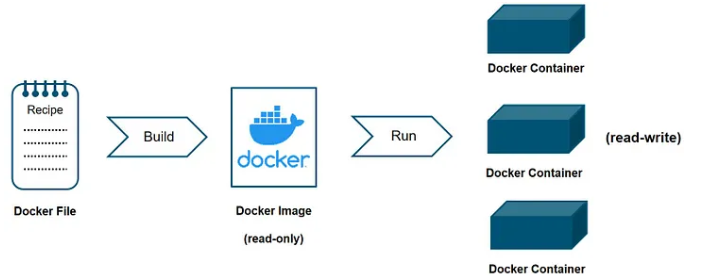
    Docker Architecture

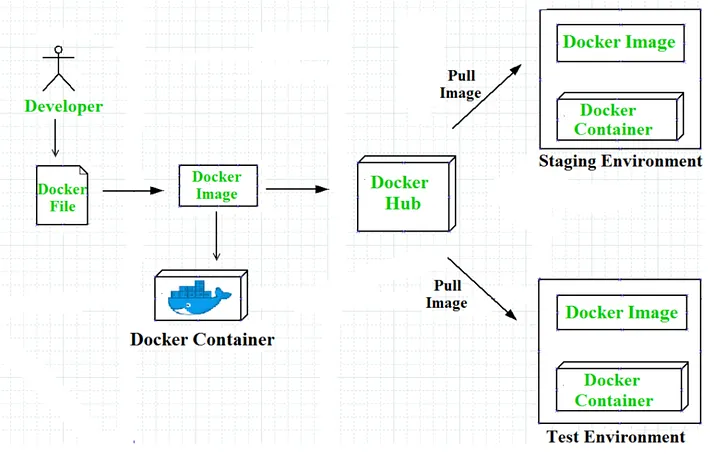
    Workflow of Docker

    Workflow of Docker

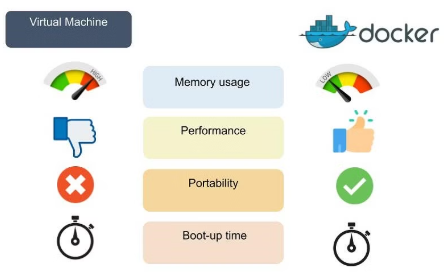
    Docker VS  Virtual Machines

    Docker vs Virtual Image

    Advantages of Docker

    Docker has become popular nowadays because of the benefits provided by Docker containers. The main advantages of Docker are

    1. Speed: The speed of Docker containers compared to a virtual machine is very fast. The time required to build a container is very fast because they are tiny and lightweight. Development, testing, and deployment can be done faster as containers are small. Containers can be pushed for testing once they have been built and then, from there, on to the production environment.
    2. Portability: The applications that are built inside Docker containers are extremely portable. These portable applications can easily be moved anywhere as a single element, and their performance also remains the same.
    3. Scalability: Docker has the ability to be deployed on several physical servers, data servers, and cloud platforms. It can also be run on every Linux machine. Containers can easily be moved from a cloud environment to a local host and from there back to the cloud again at a fast pace.
    4. Density: Docker uses the resources that are available more efficiently because it does not use a hypervisor. This is the reason that more containers can be run on a single host as compared to virtual machines. Docker containers have higher performance because of their high density and no overhead wastage of resources.

    Disadvantages of Docker:

    As convenient as the Docker container mechanism is, it has its drawbacks:

    1. Complexity: Docker may be complex to comprehend and configure for those unfamiliar with containerization. It takes some technical knowledge to create Docker files, manage container images, handle networking, and arrange containers.
    2. Security: Any reconfiguration of the containers may potentially expose the system to security risks. Although there are ways to enhance Docker’s safety, it requires expertise and careful attention to detail.
    3. Performance: While Docker containers are usually more efficient than regular virtual machines, they may not be optimal for resource-intensive applications requiring high performance and low latency, as resources are shared with the host system.
    4. Compatibility: Containerization may not be suitable for legacy applications or those relying on specific kernel features. What’s more, Docker primarily runs on Linux, and even though there are Docker adaptations for Windows and macOS, some features might differ depending on the operating system (OS).

    Components of Docker:

    The Docker components are divided into two categories: basic and advanced. The basic components include the Docker client, Docker image, Docker Daemon, Docker Networking, Docker registry, and Docker container, whereas Docker Compose and Docker Swarm are the advanced components of Docker.

    Basic Docker Components:

    Let’s dive into basic Docker components:
    Docker Client: The first component of Docker is the client, which allows the users to communicate with Docker. Being a client-server architecture, Docker can connect to the host remotely and locally. As this component is the foremost way of interacting with Docker, it is part of the basic components. Whenever a user gives a command to Docker, this component sends the desired command to the host, which further fulfills the command using the Docker API. If there are multiple hosts, then communicating with them is not an issue for the client, as it can interact with multiple hosts.

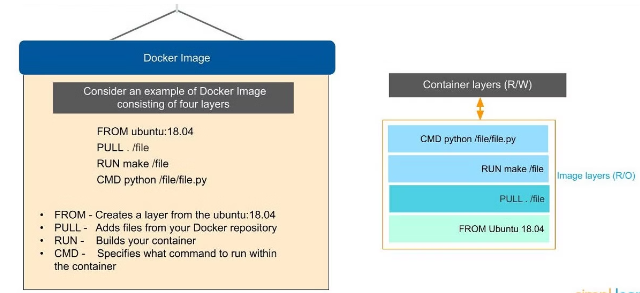
    Docker Image: Docker images are used to build containers and hold the entire metadata that elaborates the capabilities of the container. These images are read-only binary templates in YAML. Every image comes with numerous layers, and every layer depends on the layer below it.

    Docker Image

    The first layer is called the base layer, which contains the base operating system and image. The layer with dependencies will come above this base layer. These layers will have all the necessary instructions in read-only, which will be the Dockerfile. A container can be built using an image and can be shared with different teams in an organization through a private container registry. In case you want to share the same outside the organization, you can use a public registry for the same.

    Docker Daemon: Docker Daemon is among the most essential components of Docker, as it is directly responsible for fulfilling the actions related to containers. It mainly runs as a background process that manages parts like Docker networks, storage volumes, containers, and images. Whenever a container startup command is given through docker run, the client translates that command into an HTTP API call and returns it to the daemon. Afterwards, the daemon analyzes the requests and communicates with the operating system. The Docker daemon will only respond to the Docker API requests to perform the tasks. Moreover, it can also manage other Docker services by interacting with other daemons.

    Docker Networking: As the name suggests, Docker networking is the component that helps in establishing communication between containers. Docker comes with five main types of network drivers, which are elaborated on below.

    None: This driver will disable the entire networking system, hindering any container from connecting with other containers.

    Bridge: The bridge is the default network driver for a container, which is used when multiple containers communicate with the same Docker host.

    Host: There are stances when the user does not require isolation between a container and a host. The host network driver is used in that case, eradicating this isolation.

    Overlay: The overlay network driver allows communication between different swarm services when the containers run on different hosts.

    macvlan: This network driver makes a container look like a physical driver by assigning a MAC address and routing the traffic between the containers through this MAC address.

    Docker Registry: Docker images require a location where they can be stored, and the Docker registry is that location. Docker Hub is the default storage location of images that stores the public registry. However, registries can either be private or public. Every time a Docker pull request is made, the image is pulled from the desired Docker registry where it was the same. On the other hand, Docker push commands store the image in the dedicated registry.

    Docker Container: A Docker container is the instance of an image that can be created, started, moved, or deleted through a Docker API. Containers are a lightweight and independent method of running applications. They can be connected to one or more networks and create a new image depending on the current state. Being a volatile Docker component, any application or data located within the container will be scrapped the moment the container is deleted or removed. Containers mostly isolate each other and have defined resources.

    Conclusion:

    Docker revolutionizes the development, deployment, and management of applications by providing a lightweight, portable, and scalable containerization solution. The architecture along with the components of Docker work in unison to enhance workflows while improving efficiency across various environments. While Docker offers tremendous speed as well as resource optimization, it also brings with it certain complexities and security considerations. All in all though, Docker is an incredibly powerful tool for modern software development, enabling teams to build flexible, reliable, and consistent applications across diverse platforms.