Blog

  • How Business Analysts Keep Projects on Track When Requirements Shift

    How Business Analysts Keep Projects on Track When Requirements Shift

    When it comes to Agile development, the fact that is to be kept in mind is that change is the only constant. Companies become dynamic because the requirements of users keep on changing. Although such changes may be value addition, as a business analyst one needs to make sure that  it does not expose a project to falling off balance. Here is where the Business Analysts come in as they can be viewed as the compass of the ship; making sure that each shift does not cause the project to take the wrong path and the new requirements align with the existing system.

    At the beginning of my career, I worked in Ellomed, a system of Electronic Health Records (EHR). The simple idea of assisting clinics and doctors with their appointments and schedules at first turned out to be much bigger. Agile being played, the requirements were evident to be changing at the very beginning. It was not about whether things would change but how to deal with these changes in a better way. The motive was to deliver a quality product at the end of the day.

    Building a Solid Foundation

    In ElloMed, the first move was to establish a non-negotiable basis, the features that would not be affected by anything.

    This anchor made certain that the core will not shake in case of later additions of improvements or even new modules. By obtaining this base, we gained flexibility, but not stability through out the process. 

    Fact: In Agile projects, a solid base minimises the rework whereby core modules are not redesigned each time there is a requirement change. The whole point in agile is about flexibility to modify the system as per the frequent requirements.

    Pharmacy Energizing

    One of the biggest changes occurred when there was the integration of pharmacy. It appeared to be another feature at first sight. However, my study found out that there were more serious problems with the current pharmacy systems:

    Pharmacy Energizing
    • Inventory was to be checked by manually checking the medicines and other items.
    • Out of date products were not marked automatically that indicates lack of expiry management
    • Interfaces were not user friendly and looked out dated.

    In the case of BAs, the issue at hand was to transform a general request, such as make pharmacy easy to manage, into specific and practical requirements.

    Our Approach:

    • Gap Analysis- Uncovered inefficiencies in existing systems.
    • Competitor Research- Research on tools available of strengths and weaknesses.
    • User-Centered design- What pharmacists and staff really needed that can help in making the pharmacy management easier. 

    The Solution:

    We introduced a full-fledged and user-friendly interface designed specifically for pharmacists- one that covered every loophole we had identified during analysis phase. 

    • Efficient expiry management with automatic alerts and red highlights for expired products 
    • Managed inventory and order controls that minimized effort and errors.
    • An intuitive design that made day-to-day tasks quicker, simpler and far more efficient.

    What seemed like a dramatic requirement shift didn’t create disruption because the foundation of ElloMed was already strong, this enhancement only elevated the system transforming it into a tool that was not just functional but genuinely easy and efficient for users.

    How BAs Maintain the timelines of projects in case of requirements shifts

    ElloMed showed that requirement changes do not necessarily cause consternation. BAs will be in a position to facilitate smooth transitions, with the correct practices that are considered from the very starting of the project.

    BAs Maintain the timelines of projects

    Here’s how:

    • Priorities: Segregate the requirements based on must-haves” vs “nice-to-haves” early on.
    • Impact Assessment: This is categorized as an evaluation of the impact of a new change on existing modules before development commences in order to make sure that every new requirement aligns with the existing system and does not break the ongoing flow.
    • Documentation: Have a clear record of all requirements, the reason behind its change and the person that authorized the change. This way we can track the record of frequent requirement change.
    • Prototyping: Prototyping allows you to check the ideas first by using quick wireframes before starting to design and code them. This is one of the most time saving processes. 
    • Requirement Alignment: Frequent sprint reviews and requirement check-ins ensure that all are on track. Here, communication is the key to ensure that everyone on the team is on the same page of understanding.

    Smart Tips for Agile BAs

    The thing is that in Agile it is not only about the process but it is about the way of thinking. Handling dynamic requirements is like sailing in a changing wind; you cannot control the wind, but you can move the sails. A few tips that I found helpful are:

    • Sort wheat and chaff apart → Figure out the must-have and nice-to-have list early in life.
    • Keep the pulse alive → Have a living history of changes and business value.
    • Big bites, small impact → Dividend large requirements into smaller deliverable units.
    • Three heads are more than one → Rapidly converge to Three Amigos strategy (BA + Dev + QA).
    • Trace back to purpose → It is always important to have changes being linked to the larger business objective.

    Lessons from Ellomed

    Ellomed was not only a project but more of an Agile classroom. Here’s what it taught me:

    • The magic ingredients are patience → Agile succeeds where you allow flexibility of its time. The presence of strong roots, the constant growth, therefore, results in the minimization of chaos in case of the change in requirements.
    • Clarity is power → Divide the amorphous thoughts into clear, testable, implementable solutions.
    • Make lemons into lemonade → Requirement shifts but the embraced requirement shifts can make the product even stronger.

    Conclusion

    Requirement changes are not a roadblock in Agile, rather a detour that can get to the destination provided that they are managed properly. It is the way the wheel is turned by BAs.

    Business Analysts are the stabilizers of the ship- when there are alterations in directions they are the people who see to it that the project does not head in the wrong direction.

    The ideal example is Ellomed: initially a functional scheduling program, it has developed into a highly reputed EHR that has smart pharmacy integration. This was because requirements changes were not feared but leveraged.

    As it is said, the strongest or the smartest do not survive, but the most adaptable one. Having the appropriate BA practices such as building the foundation, prioritization and flexibility, the projects do not only remain on track but also emerge as solutions that count.

    Facing shifting requirements in your Agile projects? Ellocent Labs expert Business Analysts specialize in impact assessments, prioritization frameworks, and prototyping strategies to keep your projects on track. Contact us today to ensure seamless project delivery.


  • Agile UI/UX Coordination: Roles, Responsibilities and Best Practices

    Agile UI/UX Coordination: Roles, Responsibilities and Best Practices

    The requirements under Agile development will not be any different, but when. This will either turn into a nightmare or a chance of the designers of the UI/UX. It lies in the structure of the design process. The product will not be shaky, inconveniencing, and difficult to modify even though the requirements are to be changed as it is planned by a well-planned UI/UX.

    Shaping a Reusable Foundation

    In Agile as a UI/UX designer, one of the most intelligent things I would do will be to develop default design items, which will be uniform throughout the product. These reusable units which are buttons, input fields, modals, and patterns of navigation are the DNA of the design system.

    • They are also useful in time savings as they do not need to rework each time they start off on a sprint.
    • They offer a visual homogeneity of the product.
    • They make the task of the developers easier because they would not be required to go through the new design repeatedly.

    And consider it to be the creation of a design language, which never loses its grammar, but gains it.

    Paper to Prototype Drafting Process

    In Agile, speed matters. That is why it is better to start with rough drafts and plunge into tools.

    layout-prototype-process

    Step 1: Paper and pencil, Plus Raw and unrefined test of user flows and positioning of constituents.

    Step 2: Low-fidelity wireframes: Finding meaning without thinking of design.

    Step 3: Illustrate drafts in working interfaces with the help of Figma prototyping.

    It implies that this stratified design suggests that the designs will be tested during the early phases and will be enhanced later during the extensive rework costs will be saved in the long-term.

    Case in Point: Ellomed

    ellomed-dashboard

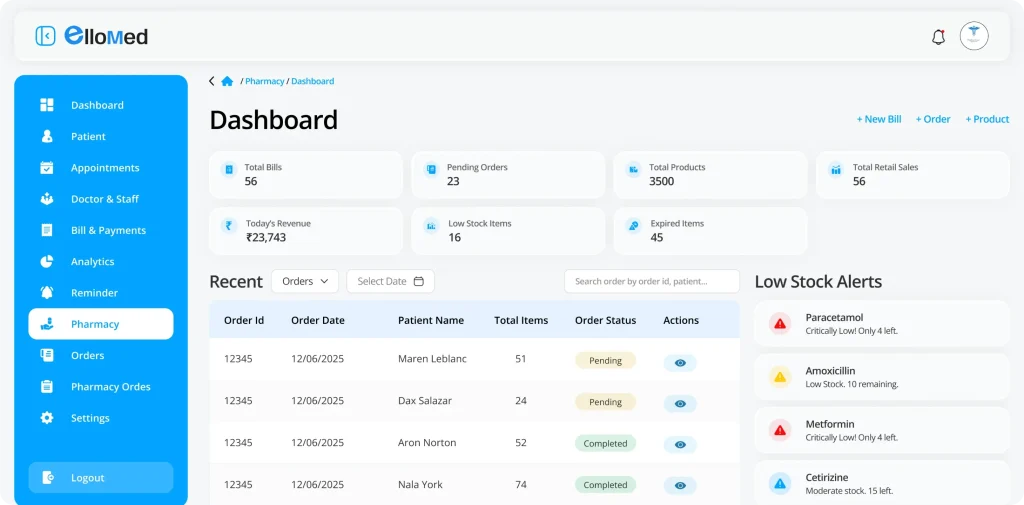
    In the case of Ellomed (a system of Electronic Health Records), the project was originally created with a straightforward concept of managing the physicians, clinics, and appointments. However, according to Agile, the requirements continued to be updated, such as pharmacy integration, patient documents, inventory management, etc.

    UI/UX coordination helped in keeping the system on track; it did so in the following manner:

    • Reusable Components: We specified the standard fields, dashboard cards, buttons, alerts, etc. They did not improve on their components by reusing them when introducing new features. This enhanced the integration as well as productivity of the UI.
    • Stability Over Adaptability: The evolving needs did not bring about the destruction of the already existing module but how to insert the other modules and not to completely break down the existing one.
    • A good disposition to the user: The designs were all tested on a real user need basis. A case in point is in the pharmacy module where the date of drugs was automatically highlighted in red where it had expired. It was not all that was related to the aesthetic element, but simplifying and accelerating working processes.

    Concisely, the need to start afresh was not the foundation of the sound basis of design adaptability.

    Ideas of Agile Best Practices of UI/UX Designers

    agile-best-practices
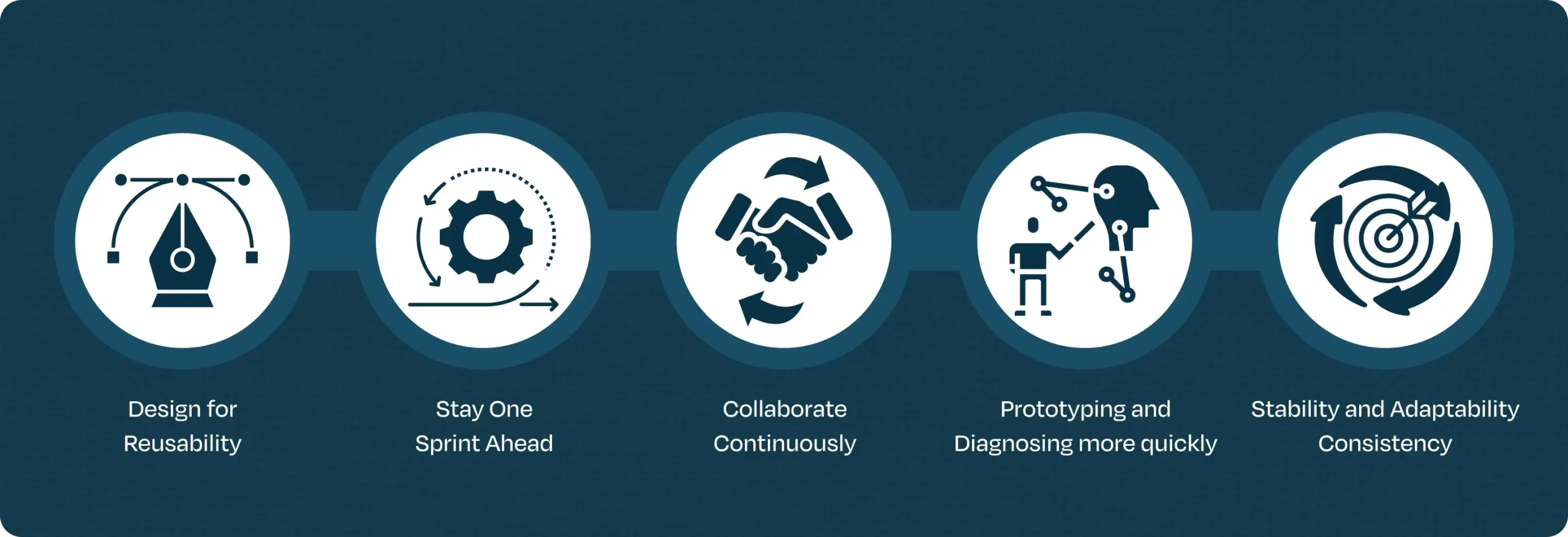
    • Design for Reusability: Early analysis of component library. Imagine it to be your LEGO box, you can do anything with it, but the pieces are the same.
    • Stay One Sprint Ahead: Plan the next sprint as the current one being developed. This will make sure that it is not rushed.
    • Collaborate Continuously: Keep up with BAs, developing and testing. Five minutes talk will save five days of re-work.
    • Prototyping and Diagnosing more quickly: The correct moment will never be to wait, to get feedback regarding drafts, and to click prototypes whenever it is possible.
    • Stability and Adaptability Consistency: These design principles must be accommodated to cater to the new needs in a non-imposing manner.

    Conclusion

    Agile does not require the presence of UI/UX coordination in order to make interfaces appealing. It is concerning the way of developing systems that could fit the change and still remain themselves. The designers are able to cope with the challenges that occur due to change of requirements, which they could center on reusable components, draft-first design, and constant teamwork, hence, transform it into an opportunity, rather than a failure.

    Practical experience with enterprises indicated that structured UI/UX causes agility to become a natural process – and the final result is not only an efficient system, but also a stable and easy to use system, coupled with being able to survive into the future.

    Transform your UI/UX collaboration with Agile best practices. Ellocent Labs offers tailored workshops and hands-on support. Get started now for more efficient, adaptable interfaces.

  • How DevOps Coordination Reduces Downtime During Critical Deployments

    How DevOps Coordination Reduces Downtime During Critical Deployments

    At the time of deployments, when downtime hits that is just not a technical issue – it involves cost, loss of revenue, frustrated customers and damage to brand reputation. That’s why good DevOps coordination matters. When development and operation teams work in coordination with clear thoughts and strategies risk is reduced and deployments become stress-free and the project is delivered without interruptions and zero downtime.

    Why Downtime Happens During Deployments

    Every organization or DevOps team faces downtime issues once a while when publishing updates to production environments. Below are the most common reasons are: 

    Why Downtime Happens During Deployments
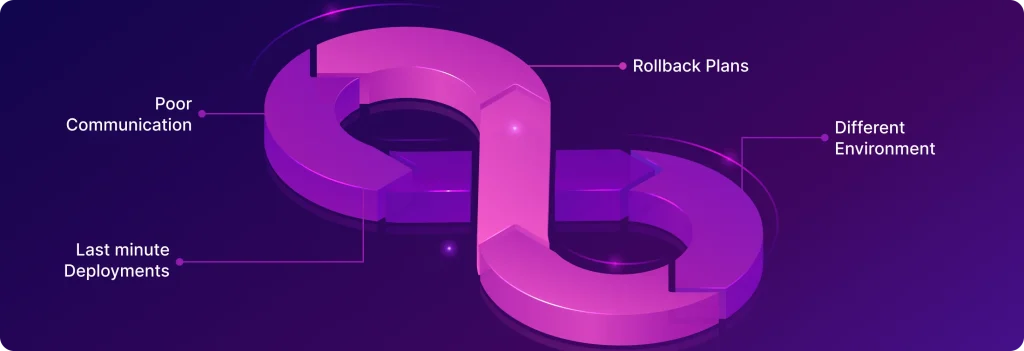
    • Poor communication – Development, QA and Devops teams are not aligned on what is going to deploy.
    • Rollback Plans – No clear rollback plan, which makes recovery slow and creates a mess if something goes wrong.
    • Different Environment – Differences between staging and production environments, causing surprises after release.
    • Last minute Deployments – Last-minute, untested changes that slip past quality checks.

    The Role of DevOps Coordination

    The Role of DevOps Coordination

    The word DevOps isn’t just about different tools — it’s about teamwork, automation, and a culture of shared responsibility. When done right, DevOps coordination plays a huge role in keeping downtime to a minimum:

    1. Reliable Rollback Plans: At the time of downtime, or when we get any hint that something is going wrong in production, the first thing required is a rollback plan. Because in production we can’t wait for the dev team to solve the issues, a well-defined rollback plan allows teams to quickly revert to a stable version, reducing recovery time and keeping downtime minimal.
    2. Better Communication : The coordination between the Development , Operations and QA team is very important. Everyone should know what’s being deployed , the risks involved and the fallback steps if something goes wrong.
    3. Automated CI/CD Pipelines: In today’s fast-paced environment, automation is essential not only to reduce the time that manual deployment takes, but also to eliminate the chance of human error. With integrated testing, security checks, and approvals, CI/CD pipelines ensure safe and consistent deployments
    4. Smarter Deployment Strategies
      Blue-green deployments and canary releases make it possible to roll out updates gradually or in isolated environments, catching issues before they affect all users.
    5. Real-Time Monitoring & Quick Response: Monitoring tools like CloudWatch, Prometheus, or the ELK Stack provide instant visibility into system health. Alerts and on-call coordination allow teams to act fast before small glitches turn into major outages.

    Advanced Deployment Strategies

    One of the strengths of DevOps is the ability to deploy new code without taking systems offline. Teams rely on proven strategies that introduce updates gradually and safely, ensuring zero downtime to users.

    • Blue/Green Deployment
      Two identical environments (Blue and Green) run in parallel. One serves live traffic (say Blue), while the other (Green) stays idle. The new release is deployed to Green, tested thoroughly, and then traffic is switched over. If issues pop up, switching back to Blue provides an instant rollback.
    • Canary Deployment
      Instead of releasing updates to everyone at once, a small set of users (the “canary”) gets the new version first. Teams monitor performance closely, and if everything looks good, the rollout expands gradually. This way, any problem only affects a limited group before being fixed.
    • Rolling Updates
      Updates are applied to a few servers at a time, replacing old versions with new ones. Since some servers keep running the old version while others move to the new one, the service stays up and available throughout the process.

    Real-World Impact of DevOps Coordination

    Imagine a large e-commerce company rolling out a critical update just before a big sales event. Without proper DevOps coordination, even a small glitch could bring the site down, blocking thousands of transactions and frustrating customers.

    Real-World Impact of DevOps Coordination

    Now, picture the same deployment with DevOps practices in place:

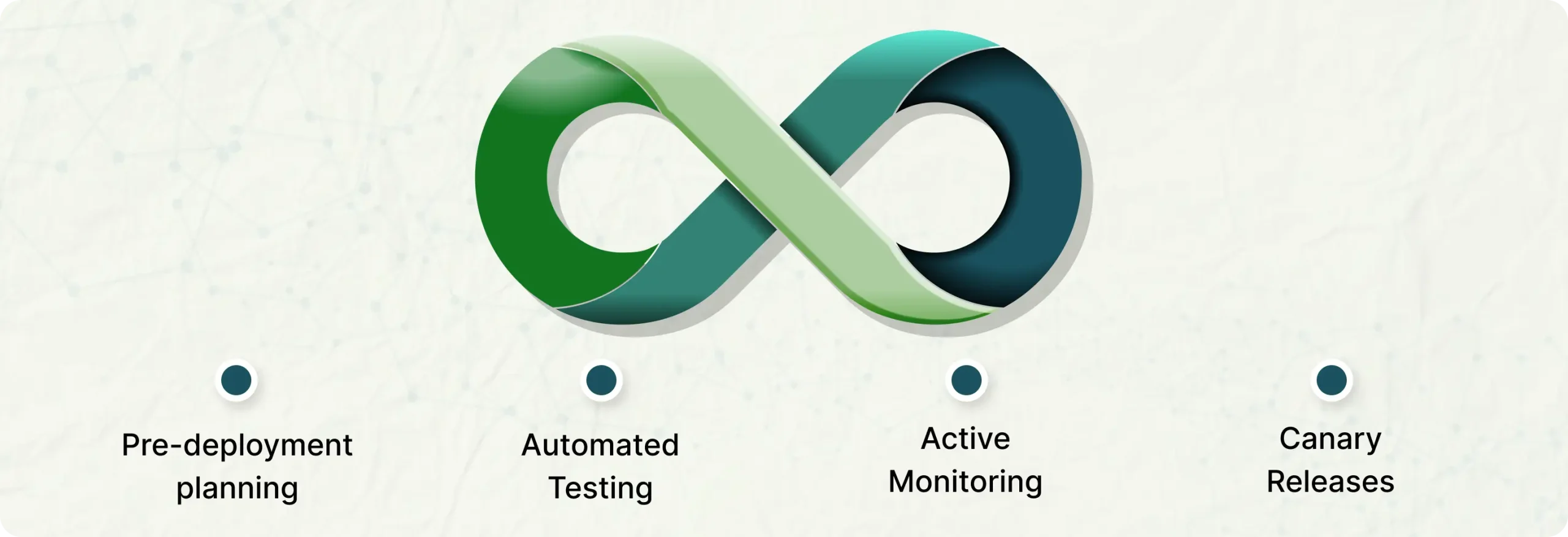
    • Pre-deployment planning keeps development and operations teams aligned and rollback plans are ready.
    • Automated testing catches issues early before they hit production.Don’t deploy to production until all the test cases have passed.
    • Canary releases let updates roll out gradually, so only a small group of users is affected if something goes wrong.
    • Active monitoring spots incidents instantly, giving teams time to fix them before they escalate.

    The result? The update goes live smoothly, customers shop without disruption, and the business avoids a costly outage.

    Best Practices for Teams

    • Maintain a checklist of tasks   – Write proper steps for the deployment process. That include strategy for zero down time and predictable risks to reduce the mistakes over production environment
    • Release notes – With good release notes we can safely deploy new functionalities to the live environment and quickly turn off the functionality  if something went wrong.
    • Shared dashboards for logs and metrics – Create a good logs and metrics dashboard like(AWS cloudwatch dashboard) to monitor the application logs and server metrics that helps teams to spot the issues and resolve them fast.
    • Feedback and Reviews  – After each deployment, we have to review what went well and what didn’t to keep improving our infrastructure and approach.

    Final Thoughts

    Downtime during critical deployments can happen  but don’t make deployment processes stressful  by poor coordination instead make it a well managed process by proper DevOps mindset.

    Don’t let deployment downtime cost your business revenue and customer trust. Ellocent Labs helps organizations achieve zero-downtime deployments through proven DevOps coordination practices. Learn how we can help transform your deployment process.

  • Top 10 Challenges in Project Coordination (and How to Overcome Them)

    Top 10 Challenges in Project Coordination (and How to Overcome Them)

    The coordination of the projects is not only a matter of monitoring tasks. It is all about linking individuals, procedures, and priorities to get things done smoothly. No project coordinator will go without difficulties. The crucial one is to know how to address them. The list of the top 10 challenges in project coordination is given here, and some tips on how to overcome these challenges, which can be applied in practice.

    1. Unclear Goals

    Unclear Goals
    • The challenge: When the project goals are not set, the teams may either waste time on guesses about what matters or do what is not important.
    • How to overcome: Have a clear plan, written objectives, and success measurement methods at the start of any project.

    2. Resource Constraints

    Resource Constraints
    • The challenge: A Lack of enough people or tools may slow it down.
    • How to overcome: Get your needs evaluated at the early stage and have a backup plan, and be honest with all about the limits.

    3. Poor Communication

    Poor Communication
    • The challenge: Due to miscommunication, the deadline may be missed, some work will be done twice, or the roles may be misunderstood.
    • How to overcome: Choose obvious methods of communication, ensure that all are understood, and keep up-to-date.

    4. Priorities Conflicts

    Priorities Conflicts
    • The challenge: It may be that the team members are dealing with a number of projects simultaneously, and it may be difficult to concentrate.
    • How to overcome: Make & share deadlines clearly. Request the team members to raise the alarm early in case of conflicts, in order to make adjustments to the priorities.

    5. Keeping Track of Documents

    Keeping Track of Documents
    • The challenge: Lost information or outdated documents may result in errors and unproductive work.
    • How to fix it: All project documents should be in one place. Ensure that they are updated whenever necessary and are sporadically checked by anyone to ensure that they are right and easy to locate.

    6. Absence of Stakeholder Engagement

    Absence of Stakeholder Engagement
    • The challenge: When the stakeholders are not consulted or unresponsive, it leads to delays in projects
    • How to fix it: Conduct regular meetings, inform them about the progress, and consult them during the decision-making process. Demonstrate to them the difference in their participation.

    7. Time Management Issues

    Time Management Issues
    • The challenge: It might become overwhelming to organize several things and deadlines, which will result in delays.
    • How to overcome: Use project management tools to track progress & prioritize tasks along with timelines. Divide large tasks into small milestones to have better focus.

    8. Changing Requirements / Scope Creep

    Changing Requirements
    • The challenge: The project continues to be delayed as clients/stakeholders continue to alter their demands.
    • How to overcome: Be specific about what is in it at the beginning. In case new requests are received, go through them and consult the team, and only approve the necessary changes.

    9. Missed Deadlines

    Missed Deadlines
    • The challenge: Delays in the tasks, which influence the entire project.
    • How to overcome: Break down work into smaller tasks with clear deadlines & track the progress regularly. If a task is falling behind, reallocate resources or escalate early.

    10. Risk Management

    Risk Management
    • The challenge: Unexpected issues can cause project delays.
    • How to overcome: Identify risks at the start and list them. Review and update risks every week. A proactive approach prevents small problems from becoming big crises.

    Final Thoughts:

    The role of project coordination is in transforming ideas into achievements,  but it is not without its challenges. Being able to manage the communication gaps, shift the priorities, and address the resource constraint issues as well as the expectations of the stakeholders, the job of a project coordinator requires flexibility, planning abilities, and effective problem-solving skills.

    The secret of overcoming these typical problems is planning well, proper communication, risk management as they arise, and appropriate tools. Coordinators can address issues and ensure a project remains on track with proper organization by maintaining readiness, teamwork, and remembering the purpose of the project.

    Ultimately,  all challenges are learning opportunities to become better and more favorable in handling projects. Under the right approach and attitude, project coordinators not only do the work, but they also contribute to the success of the project.

    Facing project coordination hurdles? Ellocent Labs offers expert project management solutions and tools to keep your teams aligned and projects on track. Reach out today!

  • Scaling AI in Enterprises: From Prototype to Production in 2026

    Scaling AI in Enterprises: From Prototype to Production in 2026

    AI projects can be small. We generate an idea in a team. Can we predict customer churn? Can we detect fraud? Can we improve delivery routes? We build a quick prototype (proof-of-concept) that shows promise.

    But the real challenge is not building that first model. The real issue is to make it something dependable, trusted and used every day throughout the entire organization. It is on the path between idea and production at scale that the real worth of AI opens up.

    From Idea to Real Business Value

    A prototype will only demonstrate what can be done. Production AI proves what’s valuable. To move forward, organizations must show that the system can help in real-world use cases.

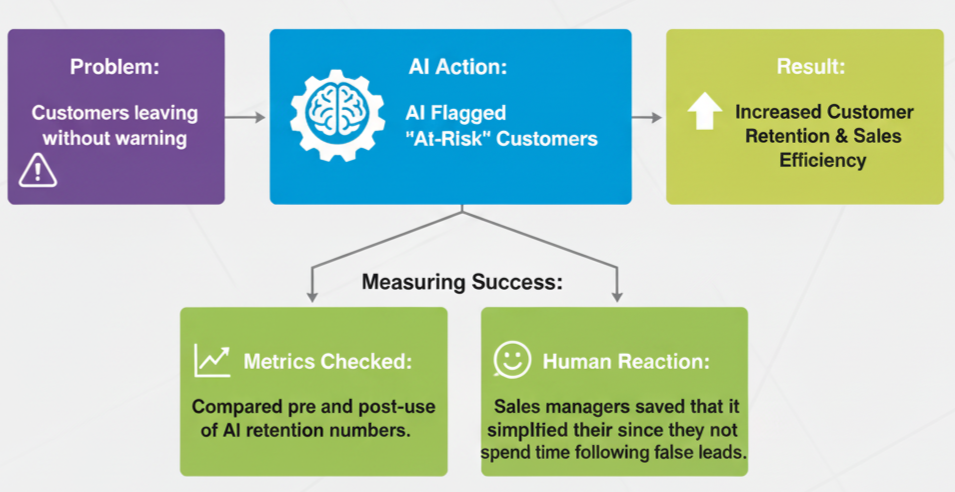
    Take a retail company. Their prototype AI identified customers to target based on their purchase history. Precision was fine, but managers inquired: “So is this actually helping us to save customers?” In order to determine, the AI was connected to their CRM, thereby enabling their sales teams to receive real-time notifications. In the near future, there was an increase in the number of reps, who targeted the right customers and retention.

    👉 Lesson: It does not matter how accurate you are. When connected to the day-to-day business operations, value will ensue when AI is involved.

    Real-World Scenarios of Scaling AI

    Here’s how different industries moved from prototypes to production systems:

    1. Retail: Keeping Customers from Leaving

    Retail: Keeping Customers from Leaving

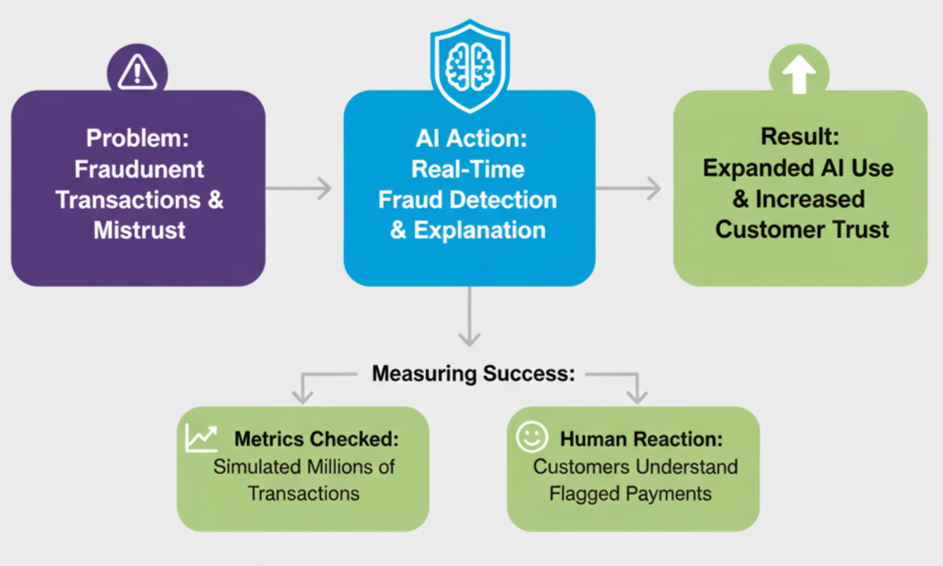
    2. Banking: Catching Fraud in Real Time

    Banking: Catching Fraud in Real Time

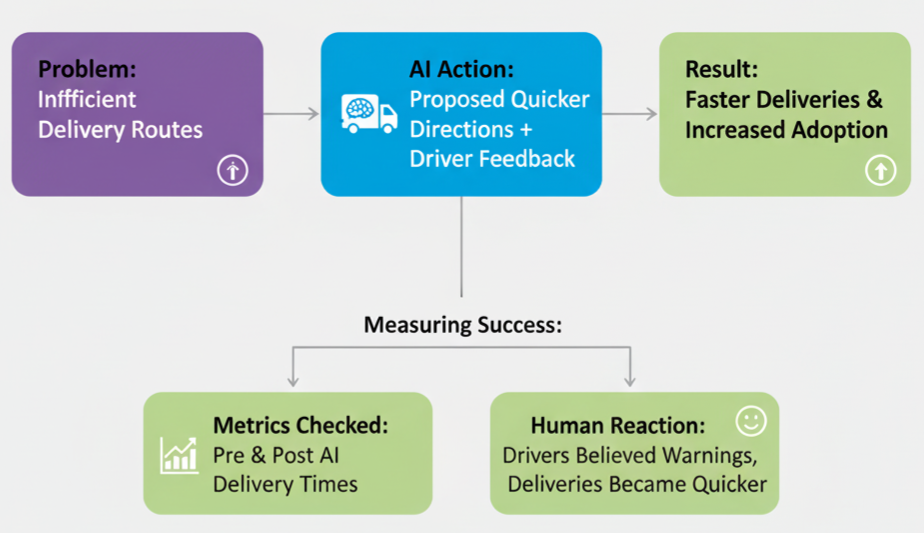
    3. Logistics: Smarter Delivery Routes

    Logistics: Smarter Delivery Routes

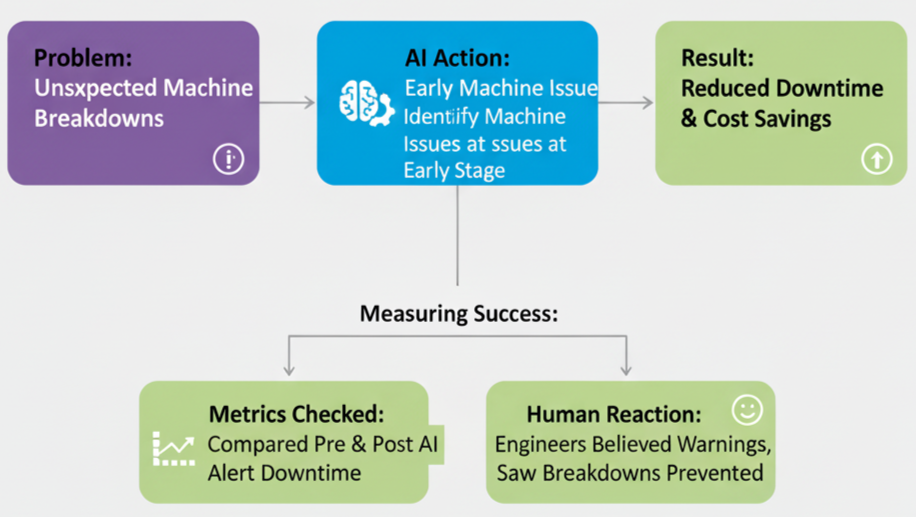
    4. Manufacturing: Preventing Machine Breakdowns

    Manufacturing: Preventing Machine Breakdowns

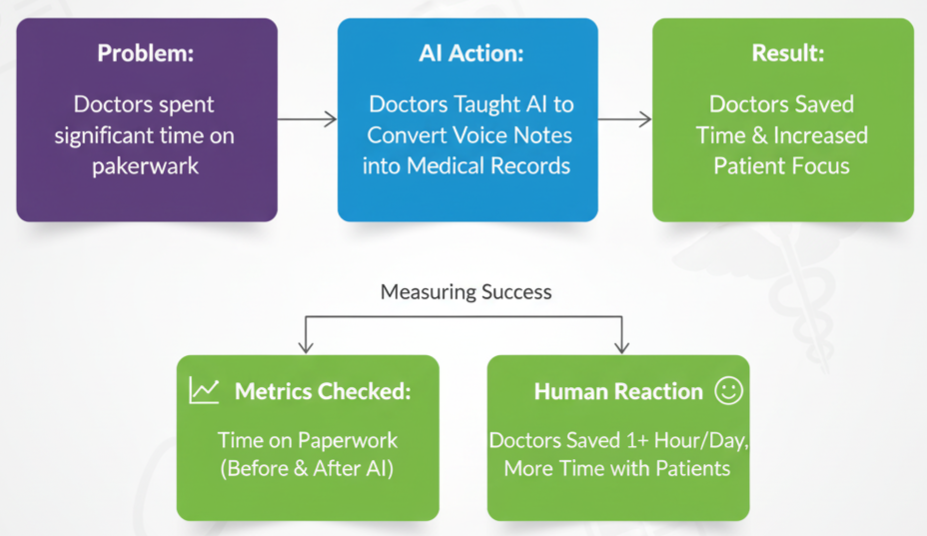
    5. Healthcare: Saving Doctors’ Time

    Healthcare: Saving Doctors’ Time

    Common Challenges in Scaling AI

    It is not merely about technology when scaling AI. Procedures and individuals are also important. Some common hurdles include:

    • Handling scale: Can the system process millions of records reliably?
    • Data security & compliance: Does it comply with legislation such as GDPR or HIPAA?
    • Trust & clarity: Does AI justify a decision?
    • Team adoption: Do the employees consider AI a tool of support and not danger?

    👉 Example: A shipping firm noticed drivers who opposed AI pathways. Their feedback was then added and adoption increased, and delivery was quicker.

    Key Takeaways

    • A prototype shows what’s possible.
    • Production AI shows what’s valuable.
    • Scaling ensures the whole organization benefits.
    • Accuracy is as important as user trust, good communication, and feedback loops.

    Final Thought: It is not the number of prototypes that the company builds that makes it the real winner of AI. They transform a working idea into a consistent system that the business applies, making a real difference in performance, cost reduction, and customer satisfaction.

    Ready to scale your AI projects beyond prototypes? Ellocent Labs’ expert team can help your enterprise deploy dependable AI solutions that generate real value. Contact us today to start your AI transformation journey.

  • Generative AI vs Traditional AI: Which is Right for Your Business?

    Generative AI vs Traditional AI: Which is Right for Your Business?

    Artificial Intelligence (AI) has changed the way companies start innovating, work, and compete. But in 2026, AI will not be a solution to everything. Businesses are now presented with a major choice: they can either go with the new Generative AI, the up-and-coming technology responsible for ChatGPT and DALL·E, or keep using Traditional AI, the established technology that drives recommendation systems, fraud detection, and predictive analytics.

    The two categories of AI address various issues and present different values. In this article, we will break down the differences, conduct a cost-benefit analysis, and help you make an informed decision on which one best fits your business.

    What is Traditional AI?

    Traditional AI focuses on pattern recognition, classification, and prediction based on structured information and rule-based systems. It uses past data to learn and make right predictions within a clear scope.

    Key Features:

    • Works with structured data (numbers, labels, historical records)
    • Rule-based algorithms and statistical models
    • Great for predictive analytics, optimization, and classification
    • Requires domain-specific data preparation and training

    Examples in Business

    • Works with structured data (numbers, labels, historical records)
    • Rule-based algorithms and statistical models
    • Great for predictive analytics, optimization, and classification
    • Requires domain-specific data preparation and training
    Generative AI

    What is Generative AI?

    Generative AI uses large-scale machine learning models (like GPT, Stable Diffusion, or Claude) to create new content: text, images, code, audio, and even video. Not only can it find patterns in evidence, but can generate new outputs to feed prompts.

    Key Features:

    • Works with both structured and unstructured data
    • Generates human-like text, images, and media
    • Leverages LLMs (Large Language Models) and foundation models
    • Enables conversational AI, content creation, and ideation

    Examples in Business:

    • Chatbots and virtual assistants (customer support)
    • Automated content creation (blogs, product descriptions, marketing copy)
    • Code generation for faster software development
    • Drug discovery and molecule design in healthcare

    Cost-Benefit Analysis (2026 Outlook)

    1. Development Cost & Resources

    • Traditional AI: Less specialized data, less infrastructure, and smaller models are required. Less expensive to implement and limited in scope.
    • Generative AI: High upfront costs (LLM training/integration, GPUs, APIs). However, pre-trained models (OpenAI, Anthropic, Hugging Face) lower the barrier.

    Choose Traditional AI if your goal is efficiency.
    Generative AI should be used in cases of innovation and involvement.

    2. Speed of Deployment

    • Traditional AI: Faster deployment for predictive use cases with structured data.
    • Generative AI: APIs can be readily integrated quickly (pre-trained), although more fine-tuning is required to support enterprise-specific applications.

    Traditional AI: best for companies with structured historical data.
    Generative AI: best for companies seeking customer-facing apps.

    3. Scalability & Flexibility

    • Traditional AI: Scales well in the limited scope it is used in but cannot handle unstructured data.
    • Generative AI: Scales across departments—from HR (resume screening bots) to marketing (ad generation).

    📌 Example: A demand forecasting done by the traditional AI can be used by an e-commerce company but the other AI-based applications can be implemented through generative AI, AI-based product description and chatbots.

    4. Accuracy vs Creativity

    • Traditional AI: Prioritizes accuracy, rules, and deterministic outputs.
    • Generative AI: Will focus on creative and contextual generation, but can give hallucinations (plausible but false result).

    Use Traditional AI where accuracy is important (finance, healthcare).
    Use Generative AI where creativity and engagement matter (marketing, product design).

    5. Security & Compliance

    • Traditional AI: This type of AI is simpler to manage because it is based on structured data the company owns.
    • Generative AI: poses a threat to intellectual property, data privacy, and bias. Needs a more governing force.

    📌 Example: A hospital can implement traditional AI to support diagnosis and pilot generative AI to implement patient communicators.

    Where Traditional AI Wins in 2026

    • Fraud detection & risk scoring in fintech
    • Predictive analytics for sales & operations
    • Quality control in manufacturing
    • Supply chain demand forecasting
    • Any use case requiring high accuracy & low tolerance for errors

    Where Generative AI Wins in 2026

    • AI-powered customer service (chatbots, virtual assistants)
    • Personalized campaigns (ad copy, automation of marketing)
    • Content generation (blogs, reports, social media posts)
    • Product design/innovation (prototyping, ideation)
    • Healthcare R&D (drug discovery, patient education tools)

    The Hybrid Approach: Generative + Traditional AI

    Forward-thinking businesses don’t see this as an either/or choice. They would rather combine the two methods to use the best.

    Example:

    • A bank can apply traditional AI to fraud detection.
    • Generative AI can also be applied by the same bank to generate individual customer financial advice reports.

    Together, they provide accuracy + engagement.

    Decision-Making Framework: Which AI is Right for Your Business?

    Ask these questions before deciding:

    1. What problem are we solving — prediction or creation?
    2. Do we work primarily with structured or unstructured data?
    3. Is accuracy or creativity more important?
    4. How much money do we have to spend on AI infrastructure and APIs?
    5. Are we ready to have governance, compliance and ethical issues?

    Pick Traditional AI → are efficiency, accuracy, and predictive insights your business drivers.
    Pick Generative AI → if engagement, personalization, and innovation matter most.
    Pick Both → if you want a long-term AI strategy.

    Conclusion

    In 2026, businesses no longer ask whether to adopt AI but which type of AI is right for them. Traditional AI remains the backbone of predictive analytics and operational efficiency, while Generative AI is rewriting the rules of creativity, customer engagement, and automation.

    The smartest organizations will adopt a hybrid AI strategy—leveraging traditional AI for accuracy and optimization while harnessing generative AI for innovation and differentiation.

    By 2026, the question of whether a business should embrace AI is a thing of the past but every business is asked what type of AI fits them. Generative AI is a complete re-write of the rules of creativity, customer engagement, and automation, but traditional AI is still the foundation of predictive analytics and operational efficiency.

    The most intelligent organizations will pursue a hybrid approach to AI use, combining traditional AI with precision and efficiency and generative AI with innovation and differentiation.

  • Low-Code vs Traditional Development: Complete Cost-Benefit Analysis for 2026

    Low-Code vs Traditional Development: Complete Cost-Benefit Analysis for 2026

    Introduction

    The software business is evolving at a rapid rate. Now, more than ever, it is necessary to choose the appropriate development approach, as a business is always under pressure to be able to generate new ideas. As early as 2026, companies will have two highly disparate options: Low-Code Development, which is fast and flexible, and Traditional Development, which will afford them complete control and even customization.

    Both approaches have advantages and disadvantages. We will complete a cost-benefit analysis in this blog, consider real-life examples, and discuss where each strategy will be most effective in 2026.

    Understanding the Two Approaches

    What is Low-Code Development?

    Low-code systems enable developers and even non-developers to create applications using minimal to no code, with drag-and-drop user interfaces and pre-written components. With these platforms, there is no need to have the vast programming experience and speed up the delivery.

    Key Features of Low-Code:

    • Graphical application developers who allow you to reuse components repeatedly.
    • Ready-to-use connector to databases and APIs.
    • Built-in security, hosting, and monitoring by the vendor
    • Subscription-based licensing models

    Popular Platforms: Bubble, Draftbit, Webflow and so on

    What is Traditional Development?

    In traditional development, you begin with nothing and create software in programming languages such as Java, Python, and JavaScript.This technique is highly flexible and scalable and has longer timelines and increased costs.

    Key Features of Traditional Development:

    • The architecture and integrations of the system are under your full control.
    • It can be customized in any manner.
    • Greater scalability and performance optimisation
    • Needs professionally trained developers and more staff.

    Popular Tech Stacks: Python, Java, JavaScript, Typescript and so on

    Cost-Benefit Analysis (2026 Outlook)

    Here’s a breakdown of how Low-Code and Traditional Development compare:

    1. Development Speed

    • Low-Code: Cuts delivery time by 60–70%. An MVP can be built in weeks instead of months.
    • Traditional: This is slower since coding, testing, and deployment are manual.

    📌 Example: An online shopping startup will launch an application in 4 weeks using low-code and 2-4 months using traditional.

    2. Cost & Resource Efficiency

    • Low-Code: Less initial investment, less development staff needed, and recurring subscription fees (between 25-50/user/month and six-figure enterprise contracts).
    • Traditional: More costly to develop initially, larger team, no vendor lock-in or continued licensing.

    📌 Example:

    • A CRM built on low-code could cost $10K upfront + $2K/month subscription.
    • The same CRM could be billed at $20 at the time of initiation by an orthodox developer, but very few recurrent expenses would be incurred.

    3. Customisation & Flexibility

    • Low-Code: Customisation confined to platters. Uniqueness is usually costly in terms of add-ons or external integrations.
    • Traditional: Infinite customization—best for unique industry needs or complex workflows.

    📌 Example: A medical app that needs HIPAA-compliant video calls and custom EHR integrations would be challenging to develop on low-code yet would be possible with conventional development.

    4. Scalability & Performance

    • Low-Code: Great for small-to-mid scale apps (1,000–50,000 users). May struggle with millions of concurrent users. Vendor scaling costs can skyrocket.
    • Traditional: It can be scaled to any size given the appropriate architecture (microservices, cloud-native, Kubernetes).

    📌 Example: A financial institution processing millions of transactions a day would have needed traditional development to be stable.

    5. Security & Compliance

    • Low-Code: Security handled by the platform vendor. Limited customization for compliance-heavy industries (finance, healthcare, government).
    • Traditional: You can decide everything related to security measures, data storage, and compliance standards such as SOC-2, HIPAA, or GDPR.

    📌 Example: A fintech application with bespoke fraud detection algorithms needs to deploy traditional dev to stay regulated.

    6. Maintenance & Updates

    • Low-Code: The vendor handles hosting, updates and patches to the platform. Risk of vendor lock-in: the business can do very little to prevent the vendor changing prices or policies.
    • Traditional: Separates dev/ops teams, but provides you with long-term freedom and flexibility.

    📌 Example: In case a low-code vendor goes out of business, it can be 2-3 times expensive to migrate to a different platform than it was to invest.

    Where Low-Code Wins in 2026

    • MVPs & Prototypes – rapidly verify thoughts.
    • Internal Business Tools – automating workflow, payroll, HR, and CRM.
    • Startups & SMEs – save cost, reduce time-to-market
    • Citizen Development – empower non-technical teams to build apps

    Where Traditional Development Wins in 2026

    • Enterprise-Grade Applications – banking, healthcare, large-scale SaaS
    • High Security Needs – fintech, government, defence
    • Complex Integrations – legacy systems, IoT, multi-cloud ecosystems
    • High Scalability – apps with millions of concurrent users

    Hybrid Approach: Best of Both Worlds

    In 2026, many organizations adopt a hybrid model:

    • Use Low-Code for front-end workflows and rapid prototyping
    • Use Traditional Development for core business logic and scalability

    📌 Example: A shipping company may use a low-code platform to create an internal dispatcher dashboard but use traditional development to create its real-time route optimization engine.

    Decision-Making Framework: Low-Code vs Traditional

    Ask These Questions Before Choosing:

    1. How much money and how much time do you have?
    2. Is it a business application or purely internal?
    3. How many users do you expect in 3–5 years?
    4. Are you required to comply with regulations (HIPAA, GDPR, PCI-DSS)?
    5. Is long-term customization more important than short-term speed?

    ✅ If speed + cost efficiency matter most → Choose Low-Code.
    ✅ If security, scale, and uniqueness matter most → Choose Traditional Development.

    Conclusion

    Low-Code platforms will drive business applications to become fast by the year 2026, enabling startups and SMEs to innovate at higher rates. However, when it comes to complex, secure and scalable enterprise systems, Traditional Development cannot be surpassed.

    The most intelligent organizations will not decide one instead of the other, they will blend the two to create a balance between agility and long-term stability.

    Looking to decide whether low-code or traditional development fits your project in 2026? Our team can assist you in cost, scale, and compliance estimation to identify a fit solution.

  • Web Development in 2025: AI, Web3, and Platform Shift

    Web Development in 2025: AI, Web3, and Platform Shift

    Modern web development faces swift changes due to the formation of new technological developments. The upcoming year of 2025 will transform the industry through three essential developments consisting of AI advancement and Web3’s expansion as well as platform-based development. Our examination will proceed through these three major predictions that are reshaping development situations for organizations and their developers.

    1. The Surge in AI-Powered Applications

    Web development experiences its most critical transformation through Artificial Intelligence because this innovative technology has surpassed buzzword status to become an essential development component. The new generation of AI tools delivers applications that provide stronger functionality through personalized interfaces and automated procedures. Key developments include:

    • Online companies utilize AI-powered chatbots as virtual assistants, which provide smooth support for customers while improving their interactions.
    • AI-based predictive analytics enables organizations to study user behaviors, which drives recommendation solutions to individual customers.
    • UX designers and developers can create AI-driven applications successfully through no-code platforms that need minimal coding.

    Developers must maintain competitive value through their understanding of AI frameworks and particularly TensorFlow and OpenAI API platforms.

    2. The Expansion of Web3 Technologies

    Web3 is revolutionizing how we interact with the web by emphasizing decentralization, blockchain integration, and user control. Major advancements to watch include:

    • People access secure, decentralized applications that operate on blockchain networks through their increased levels of transparency and security.
    • Smart Contracts: Automating agreements and transactions without intermediaries.
    • Modern digital asset possession and client ownership via NFTs alongside tokenized products transform business content ownership and generate business revenue streams.

    All developers now need to master blockchain technologies, including Solidity, or should understand the Ethereum and Polkadot platforms.

    3. The Shift Toward Platform-Centric Development

    Businesses need seamless operations, prompting the creation of unified platform-based ecosystems that integrate various services.

    • Headless CMS: A headless CMS provides organizations with content management independence from frontend delivery systems that create improved operational flexibility.
    • Microservices Architecture: Building modular, scalable applications for specific functionalities.
    • Cross-Platform Development: Organizations build user-consistent platforms through the implementation of development technologies such as Flutter and React Native.

    These methods help organizations construct solid, interconnected systems that fulfill different user requirements.

    Preparing for the Future of Web Development

    To thrive in 2025, developers and businesses should:

    • Your organization should dedicate itself to continuing to learn about current and emerging technology and framework developments.
    • Businesses need to merge their efforts with designers and marketers along with data scientists to generate complete solutions for their projects.
    • Preventive security measures should become paramount because cyber threats are expected to escalate, so focus on developing applications that are both secure and reliable.

    Final Thoughts

    The future of web development remains dynamic because it possesses numerous available opportunities for advancement. Companies and developers who use AI along with Web3, along with platform-focused approaches, will lead the market. Ellocent Labs dedicates itself to leading clients through digital evolution to achieve transformative results in the digital era.

    Contact us today to discuss how we can help you achieve your web development goals.

  • SEO Trends 2025: Making Your Brand Shine with AIO, GEO, AEO and SXO

    SEO Trends 2025: Making Your Brand Shine with AIO, GEO, AEO and SXO

    The online world is always changing, and 2025 is a big year for how businesses get found on search engines. You might hear some people say, “SEO is dead,” but that’s not true at all! Instead, SEO is simply growing and changing, mostly because of Artificial Intelligence (AI) in search. This isn’t a problem; it’s a huge chance for those who are ready to learn and adapt. Google isn’t just counting keywords anymore; it’s looking at how good your content is, what it means, and how easy it is for people to use.

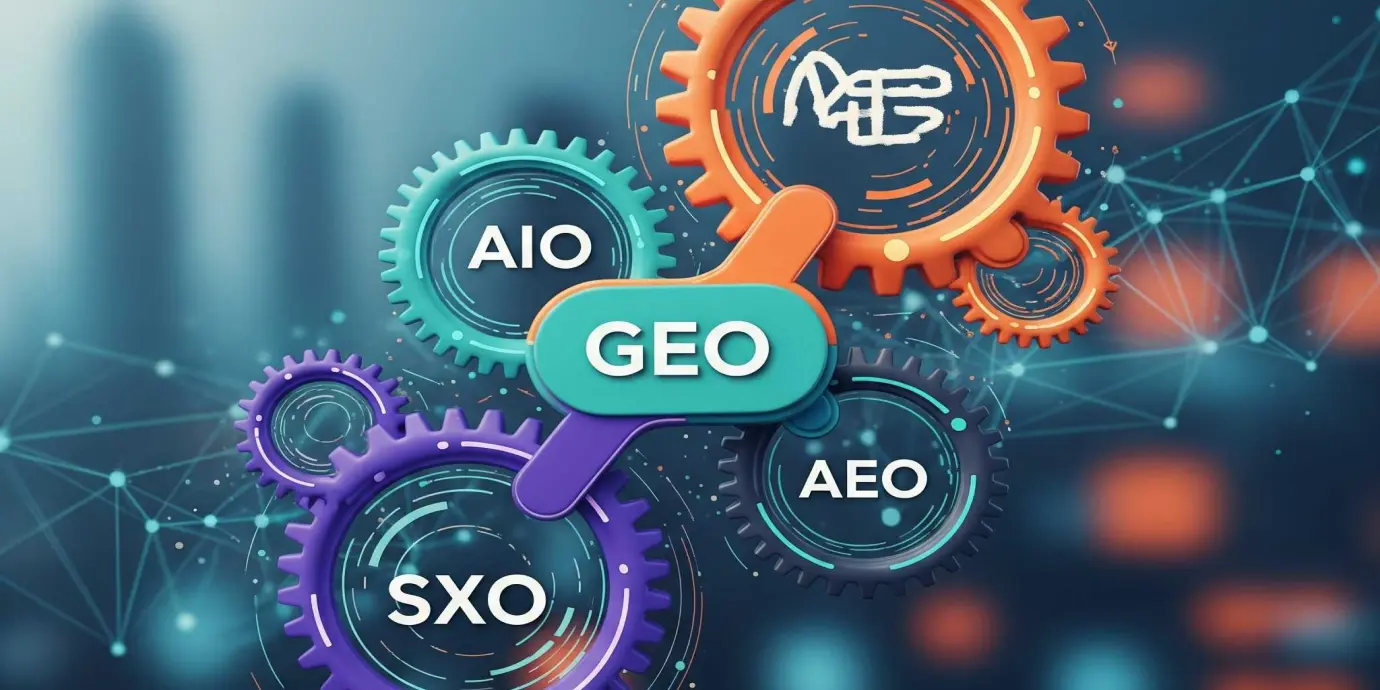
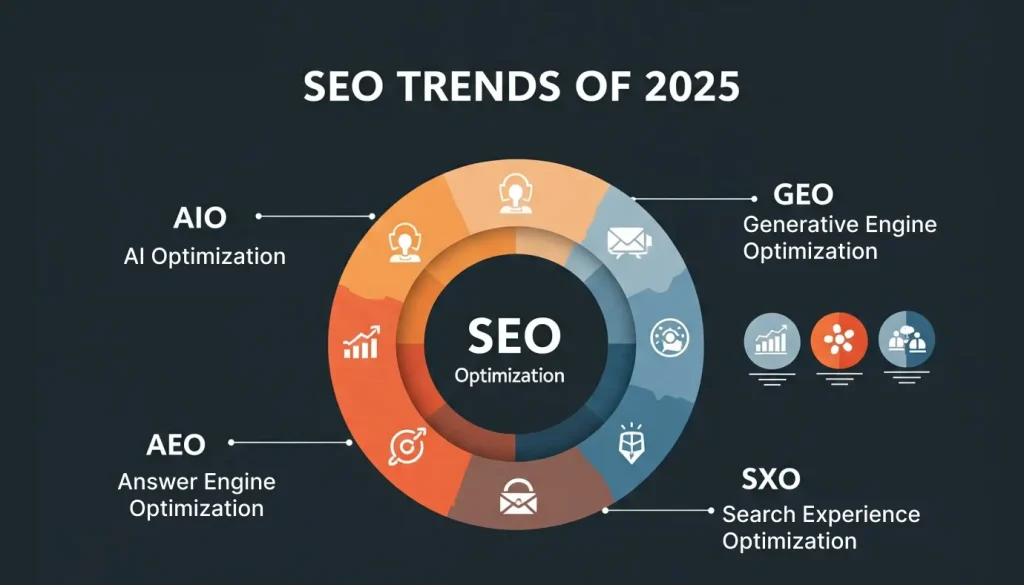
    To do well in this new world, businesses need to go beyond old SEO tricks. They need to use a smarter, more connected way of thinking. This means understanding and combining four key ideas: AI Optimization (AIO), Generative Engine Optimization (GEO), Answer Engine Optimization (AEO), and Search Experience Optimization (SXO). These techniques, when used together, are vital for keeping your company prominent and competitive online.

    The traditional notion of simply “ranking” high is evolving. Today, it’s more a question of “being the answer” or “being mentioned” by machines. This implies that success is no longer merely the click on a blue link. It is about being the authoritative source that a machine mentions. This alters the manner in which companies define success and strategize their content.

    Understanding the New SEO Terms

    Let’s break down these new terms to see how they fit into the future of SEO.

    AIO: AI Optimization 

    Making your website’s content simple for AI-driven search engines to comprehend and summarize is the main goal of AI Optimization (AIO). Consider it a way to make your material “machine-readable.” Google’s AI Overviews, which provide instant responses directly on the search page, are expanding. This suggests that fewer people might visit your website.   However, Google is making these AI Overviews more link-rich, so even if your website is small, it will still be seen. Getting your brand recognized and highlighted in these AI summaries is now the primary goal, rather than simply generating clicks.

    GEO: Generative Engine Optimization

    Generative Engine Optimization (GEO) is all about creating your content in such a high quality that AI tools like Google’s Search Generative Experience (SGE) prefer to use it when they generate their answers. It’s all about being the go-to source that AI quotes or mentions. Unlike classical SEO, which desires a click, GEO desires your content to be “the answer” itself. This is to say that your content must be extremely clear, credible, and display actual expertise. AI adores unique insights, original research, and facts that it simply can’t manufacture on its own.

    AEO: Answer Engine Optimization

    Answer Engine Optimization (AEO) focuses on making your content give direct, short answers to people’s questions. This helps your content show up in “featured snippets” (those quick answer boxes at the top of Google), “People Also Ask” sections, and especially in voice search results. With devices like Alexa and Siri, people get spoken answers without seeing website links. So, being the main source for an answer engine not only makes you more visible but also shows your brand as a trusted expert. AEO means using natural language and answering questions directly, often in a Q&A style.

    SXO: Search Experience Optimization

    Search Experience Optimization (SXO) involves marrying traditional SEO with the way users really behave on your site (User Experience or UX). Its primary purpose is ensuring that after finding your site, users have an easy, quick, and pleasant time. If your website is slow to load or difficult to navigate on mobile, users will leave quickly, regardless of your search ranking. SXO ensures your site is engaging and user-friendly, helping to keep visitors and encouraging actions like sign-ups and purchases.

    How They Work Together for Maximum Impact

    The real power of these four strategies lies in their combined use. They are not separate ideas; they work hand-in-hand to make each other stronger.

    • AIO lays the groundwork by making your content easy for AI to understand.
    • Then, GEO uses that understanding to get your content mentioned and quoted by AI.
    • AEO builds on this by making your content appear as direct answers in search results and voice searches.
    • Finally, SXO ensures that when people visit your site, they have a great experience, which encourages them to stay and convert.

    This creates a positive cycle: good content that AI understands leads to more mentions, which leads to more direct answers, and a great website experience keeps people happy and coming back. This combined approach helps your brand be seen and trusted everywhere online, not just in traditional search results.

    Simple Steps to Get Started

    To use these strategies, focus on quality, what users want, and a good technical setup:

    • Create Great Content:
      • Be an Expert: Show your experience, knowledge, and trustworthiness. Mention your sources and have real experts write your content.
      • Keep it Clear and Short: Structure your content with clear headings, bullet points, and Q&A sections so AI can easily pull out answers.
      • Use Schema Markup: This is like giving AI a map of your content, helping it understand what your page is about.
      • Think Like a Human: Use natural, conversational language, especially for voice search.
    • Make Your Website Fast and Easy to Use:
      • Speed Matters: Make sure your website loads super fast on all devices, especially phones.
      • Easy to Navigate: Design your website so people can easily find what they’re looking for.
      • Engaging Visuals: Use good images, videos, and charts to make your content more interesting.
    • Build Trust and Authority:
      • Become a Go-To Source: Create lots of detailed content on your topic to show you’re an expert.
      • Get Good Links: Get links from other trusted websites.
      • Local SEO: If you have a physical business, make sure your Google Business Profile is updated and get local reviews.

    Looking Ahead

    The world of SEO is always changing, but human expertise is still key. AI tools can help with research and content ideas, but real creativity, unique ideas, and building trust still come from people. The future of SEO is exciting, and by embracing these new, connected strategies, your business can stay ahead and truly shine online.

  • What are AI agents, and How do They Impact Today Market and Websites?

    What are AI agents, and How do They Impact Today Market and Websites?

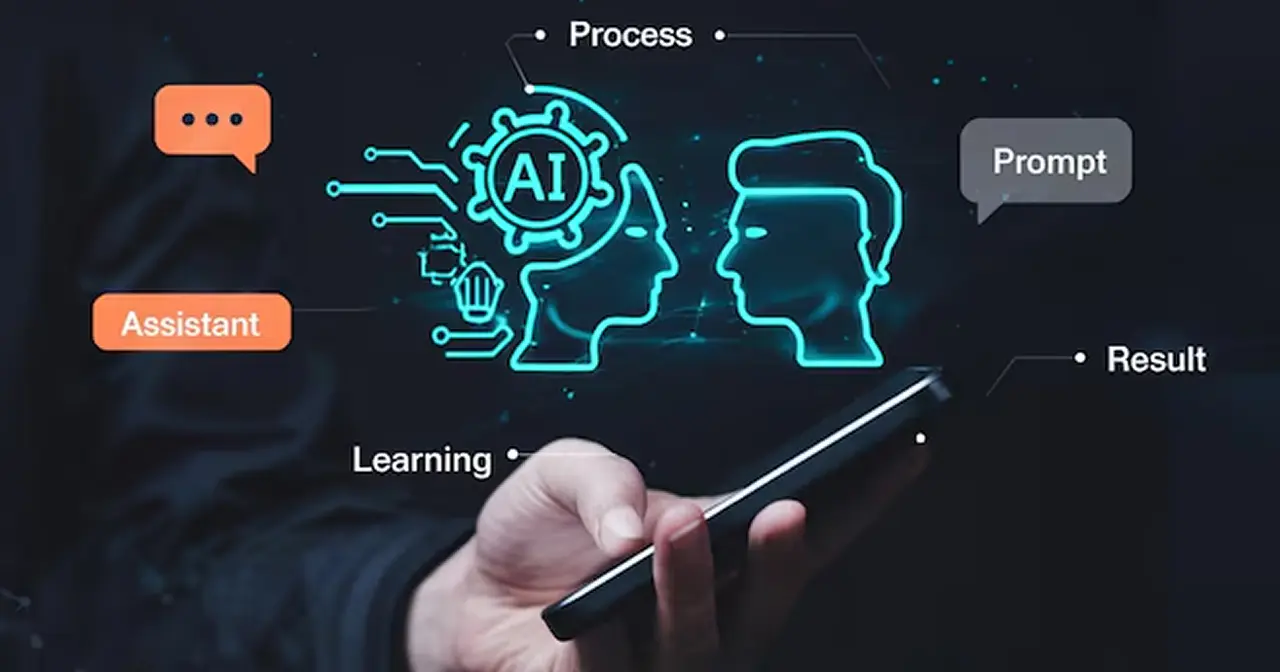
    Advanced artificial intelligence gives autonomous systems their AI agent operation capabilities. These agents differ from standard chatbots because they execute advanced jobs while gaining understanding from user conversations, then respond independently in new situations without extensive human assistance. A thorough examination of AI agents explains their impact on websites together with the wider market.

    Understanding AI Agents

    AI agents represent the modern version of AI technology through which they integrate these features:

    • Machine Learning: It allows systems to enhance their abilities through continuous learning operations.
    • Natural Language Understanding (NLU): The system with Natural Language Understanding (NLU) efficiently processes difficult content while simulating human response capabilities.
    • Autonomous Decision-Making: These systems operate independently for the achievement of specified targets through autonomous decision-making processes.

    AI agents provide businesses with flexibility for executing various tasks, which include customer service and data analysis, making them a valuable tool for companies.

    How AI Agents Are Revolutionizing Websites

    • Enhanced User Experiences AI agents provide personalized, intuitive interactions that engage users. For example:
    • Automation of Routine Tasks Websites integrated with AI agents can automate repetitive tasks such as:
      • Booking appointments
      • Managing customer inquiries
      • Processing transactions
    • This not only saves time but also ensures consistent service quality.
    • Advanced Analytics and Insights AI agents can collect and analyze user data to:
      • Identify trends and patterns
      • Offer actionable insights for website optimization
      • Predict user needs to improve engagement and conversions

    The Impact on Today’s Market

    • Improved Efficiency and Scalability AI agents help businesses achieve operational expansion at increased efficiency levels. Organizations deploy AI agents across their e-commerce platforms together with financial services to achieve effective operations at extensive levels. 
    • Increased Revenue Opportunities AI agents boost revenue opportunities through their ability to create personalized experiences and handle automated sales, which results in increased conversions while satisfying customers.
    • Competitive Advantage Organizations that use AI agents first achieve substantial competitive value by giving their customers advanced solutions with premium experiences, thereby differentiating themselves in market competition.
    Future of AI Agent in Website and Markets

    The Future of AI Agents in Websites and Markets

    AI technology development will result in AI agents acquiring the following capabilities:

    • Become More Intuitive: The ability to sense user emotions and contextual understanding will become better.
    • Expand Across Industries: AI agents will demonstrate increasing importance in managing all business sectors, starting from healthcare right through to entertainment.
    • Drive Hyper-Personalization: Every user interaction will become personalized according to individual preferences through Drive Hyper-Personalization.

    Final Thoughts

    AI agents have moved from future potential to current reality because they now change website behavior and the manner businesses interact with their customers. AI agents help companies optimize their operations while improving customer experiences to achieve better market position in the fast-moving industry.

    At Ellocent Labs, we specialize in integrating AI agents into websites and digital platforms. Let us help you unlock the full potential of AI for your business.

    Contact us today to learn more about AI solutions tailored to your needs.