Tag: DevOps

  • How DevOps Coordination Reduces Downtime During Critical Deployments

    How DevOps Coordination Reduces Downtime During Critical Deployments

    At the time of deployments, when downtime hits that is just not a technical issue – it involves cost, loss of revenue, frustrated customers and damage to brand reputation. That’s why good DevOps coordination matters. When development and operation teams work in coordination with clear thoughts and strategies risk is reduced and deployments become stress-free and the project is delivered without interruptions and zero downtime.

    Why Downtime Happens During Deployments

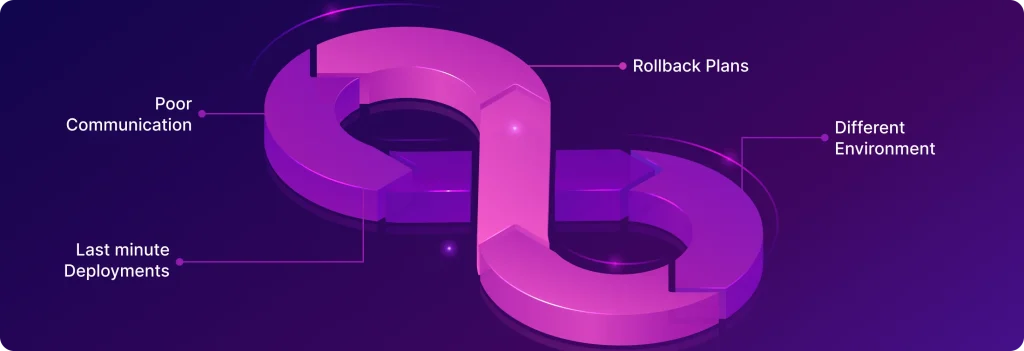
    Every organization or DevOps team faces downtime issues once a while when publishing updates to production environments. Below are the most common reasons are: 
    Why Downtime Happens During Deployments
    • Poor communication – Development, QA and Devops teams are not aligned on what is going to deploy.
    • Rollback Plans – No clear rollback plan, which makes recovery slow and creates a mess if something goes wrong.
    • Different Environment – Differences between staging and production environments, causing surprises after release.
    • Last minute Deployments – Last-minute, untested changes that slip past quality checks.

    The Role of DevOps Coordination

    The Role of DevOps Coordination

    The word DevOps isn’t just about different tools — it’s about teamwork, automation, and a culture of shared responsibility. When done right, DevOps coordination plays a huge role in keeping downtime to a minimum:

    1. Reliable Rollback Plans: At the time of downtime, or when we get any hint that something is going wrong in production, the first thing required is a rollback plan. Because in production we can’t wait for the dev team to solve the issues, a well-defined rollback plan allows teams to quickly revert to a stable version, reducing recovery time and keeping downtime minimal.
    2. Better Communication : The coordination between the Development , Operations and QA team is very important. Everyone should know what’s being deployed , the risks involved and the fallback steps if something goes wrong.
    3. Automated CI/CD Pipelines: In today’s fast-paced environment, automation is essential not only to reduce the time that manual deployment takes, but also to eliminate the chance of human error. With integrated testing, security checks, and approvals, CI/CD pipelines ensure safe and consistent deployments
    4. Smarter Deployment Strategies
      Blue-green deployments and canary releases make it possible to roll out updates gradually or in isolated environments, catching issues before they affect all users.
    5. Real-Time Monitoring & Quick Response: Monitoring tools like CloudWatch, Prometheus, or the ELK Stack provide instant visibility into system health. Alerts and on-call coordination allow teams to act fast before small glitches turn into major outages.

    Advanced Deployment Strategies

    One of the strengths of DevOps is the ability to deploy new code without taking systems offline. Teams rely on proven strategies that introduce updates gradually and safely, ensuring zero downtime to users.

    • Blue/Green Deployment
      Two identical environments (Blue and Green) run in parallel. One serves live traffic (say Blue), while the other (Green) stays idle. The new release is deployed to Green, tested thoroughly, and then traffic is switched over. If issues pop up, switching back to Blue provides an instant rollback.
    • Canary Deployment
      Instead of releasing updates to everyone at once, a small set of users (the “canary”) gets the new version first. Teams monitor performance closely, and if everything looks good, the rollout expands gradually. This way, any problem only affects a limited group before being fixed.
    • Rolling Updates
      Updates are applied to a few servers at a time, replacing old versions with new ones. Since some servers keep running the old version while others move to the new one, the service stays up and available throughout the process.

    Real-World Impact of DevOps Coordination

    Imagine a large e-commerce company rolling out a critical update just before a big sales event. Without proper DevOps coordination, even a small glitch could bring the site down, blocking thousands of transactions and frustrating customers.
    Real-World Impact of DevOps Coordination

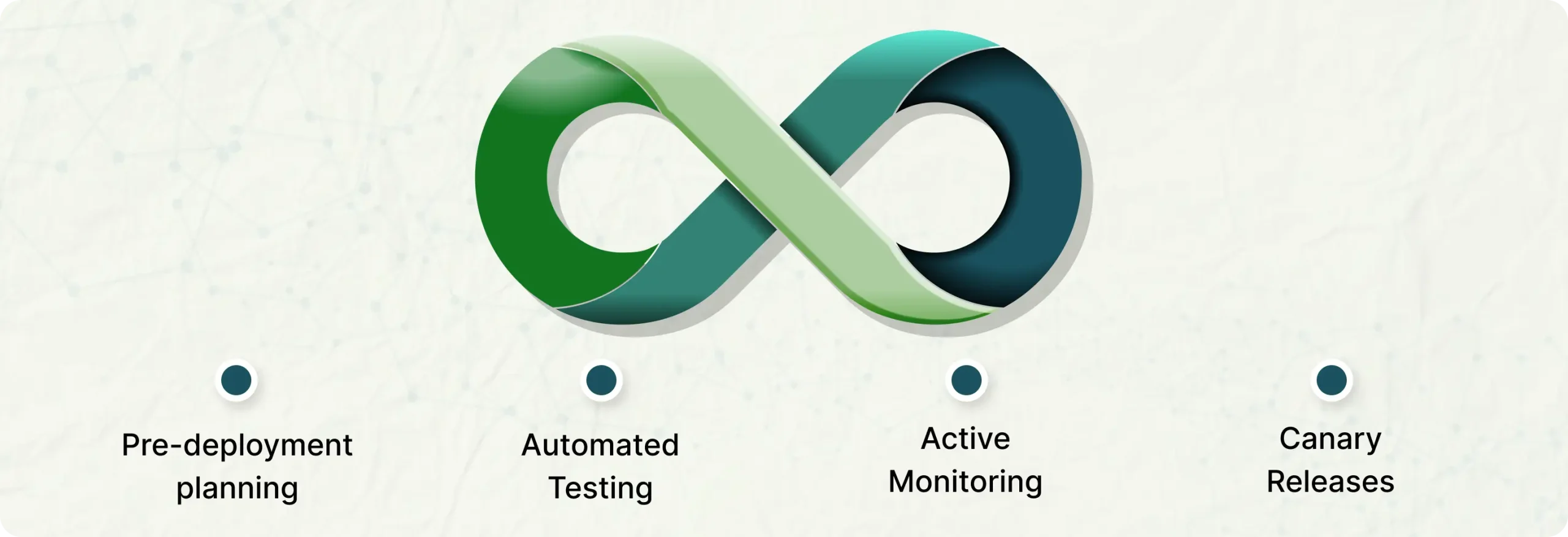
    Now, picture the same deployment with DevOps practices in place:

    • Pre-deployment planning keeps development and operations teams aligned and rollback plans are ready.
    • Automated testing catches issues early before they hit production.Don’t deploy to production until all the test cases have passed.
    • Canary releases let updates roll out gradually, so only a small group of users is affected if something goes wrong.
    • Active monitoring spots incidents instantly, giving teams time to fix them before they escalate.

    The result? The update goes live smoothly, customers shop without disruption, and the business avoids a costly outage.

    Best Practices for Teams

    • Maintain a checklist of tasks   – Write proper steps for the deployment process. That include strategy for zero down time and predictable risks to reduce the mistakes over production environment
    • Release notes – With good release notes we can safely deploy new functionalities to the live environment and quickly turn off the functionality  if something went wrong.
    • Shared dashboards for logs and metrics – Create a good logs and metrics dashboard like(AWS cloudwatch dashboard) to monitor the application logs and server metrics that helps teams to spot the issues and resolve them fast.
    • Feedback and Reviews  – After each deployment, we have to review what went well and what didn’t to keep improving our infrastructure and approach.

    Final Thoughts

    Downtime during critical deployments can happen  but don’t make deployment processes stressful  by poor coordination instead make it a well managed process by proper DevOps mindset.

    Don’t let deployment downtime cost your business revenue and customer trust. Ellocent Labs helps organizations achieve zero-downtime deployments through proven DevOps coordination practices. Learn how we can help transform your deployment process.


  • Revolutionizing SaaS Scalability: Automating Multi-Client Onboarding Solution With a Single Codebase

    Revolutionizing SaaS Scalability: Automating Multi-Client Onboarding Solution With a Single Codebase

    Managing a multi-client SaaS application can be challenging, especially when onboarding new businesses involves repetitive manual tasks like setting up custom domains, configuring Amazon Cognito user pools, creating email templates, and provisioning storage. As the number of clients grows, this manual process becomes time-consuming, error-prone, and difficult to scale.

    To streamline and simplify the onboarding process, we offer a powerful solution. By leveraging CloudFormation templates, you can dynamically automate the setup of resources required for each new business, ensuring consistency, reducing manual effort, and accelerating client onboarding.

    Let’s explore how to create reusable templates that make your SaaS platform scalable, efficient, and future-ready.

    Challenges Faced in Traditional SaaS Client Onboarding

    Onboarding new clients to a SaaS platform is often a manual and error-prone process that can create significant challenges. Companies encounter these hurdles during traditional client onboarding:

    Time-Consuming Setup: Each new client requires custom configurations for domains, user pools, email templates, and storage. These tasks are repetitive and time-consuming, especially as the number of clients increases, leading to delays and operational bottlenecks. Clients expect quick setup times and fast time-to-value. Manual onboarding processes slow down the process, delaying the point at which clients can start using the service effectively. This can lead to dissatisfaction and a higher churn rate.

    Manual Configuration Errors: The more manual steps involved in onboarding, the greater the chance of mistakes. Variations in setup lead to unpredictable behavior, making it difficult to troubleshoot and maintain a consistent service level.

    Inconsistent Client Experiences: Without an automated process, each client onboarding can vary in terms of configurations and settings. This lack of consistency can lead to unpredictable behavior, challenges in troubleshooting, and difficulties in scaling the platform effectively.

    Scalability Issues: As the number of clients grows, managing manual onboarding becomes increasingly difficult. It becomes harder to ensure that each new client receives the necessary resources in a consistent and efficient manner, leading to slower growth and higher operational costs.

    Resource Management Challenges: Allocating and managing resources like storage and Cognito user pools can become overwhelming as the client base grows. Ensuring each client gets the correct allocation of resources.

    Our Innovative Solution: Automating Client Onboarding with One Click

    Our solution streamlines the entire client onboarding process by automating tasks like domain configuration, Amazon Cognito user pool setup, email template creation, and storage provisioning—all with a single click. This eliminates manual effort, reduces errors, and ensures consistency across all clients, leading to faster and more reliable onboarding.

    With automation in place, resource allocation is optimized, ensuring each client receives the correct resources without over-provisioning or under-provisioning. This solution also enhances scalability, allowing your platform to grow effortlessly without delays. By securely provisioning client data and ensuring compliance, we address security concerns and reduce risks, enabling clients to get up and running quickly with minimal friction and maximum efficiency.

    Our Approach to Success:

    To bring our innovative solution to life, we focused on creating a streamlined and automated onboarding process that could handle every aspect of client setup efficiently. Here’s how we achieved it:

    Centralized Automation Platform:

    We developed a centralized platform that integrates all necessary services like custom domain management, Cognito user pool configurations, email template creation, and storage provisioning. This platform ensures that every client’s resources are set up automatically and consistently with minimal manual intervention.

    Predefined Templates for Resource Allocation:

    We have designed reusable templates that define the configurations for each client’s domain, user pool, and storage. These templates are automatically applied during the onboarding process, ensuring that every client receives a consistent, high-quality setup. Once the domain and Cognito user pool are successfully created using the templates on the server, we store the Cognito details and domain configurations in the database for each business subscription.

    Efficient Multi-Client Database Management:

    By managing multiple clients within a single database, we can streamline data handling, improve performance, and reduce operational overhead. This solution leverages advanced data partitioning and access control techniques to isolate each client’s data, ensuring security and preventing cross-client data access. As a result, clients enjoy the benefits of a dedicated database experience without the complexity and cost of maintaining separate databases for each one.

    Security and Compliance Best Practices:

    Security was a top priority in our solution. We implemented automated access controls and resource isolation for each client, ensuring that their data is secure and compliant with industry standards. This automated setup reduces the risks associated with manual configurations and ensures that security is maintained consistently.

    User-Friendly Interface:

    We designed an intuitive, user-friendly interface that allows platform administrators to trigger the entire onboarding process with a single click. The interface provides transparency, showing the status of the setup and any required actions, making it easy for administrators to track and manage the onboarding process.

    By combining automation, scalability, and security, we created a solution that addresses the key challenges of traditional onboarding, reducing manual effort, increasing efficiency, and ensuring a consistent, secure client experience.

    Conclusion

    By automating the onboarding process, we’ve helped SaaS businesses:

    • Reduce time-to-market: Onboard new clients faster and get them up and running more quickly.
    • Improve client satisfaction: Deliver a consistent and reliable service experience.
    • Increase operational efficiency: Free up valuable resources for other critical tasks.
    • Gain a competitive edge: Scale your business with confidence and accelerate your growth.

    Ready to transform your SaaS business? Let’s innovate together!

  • Kubernetes Unraveled: Mastering Container Orchestration

    Kubernetes Unraveled: Mastering Container Orchestration

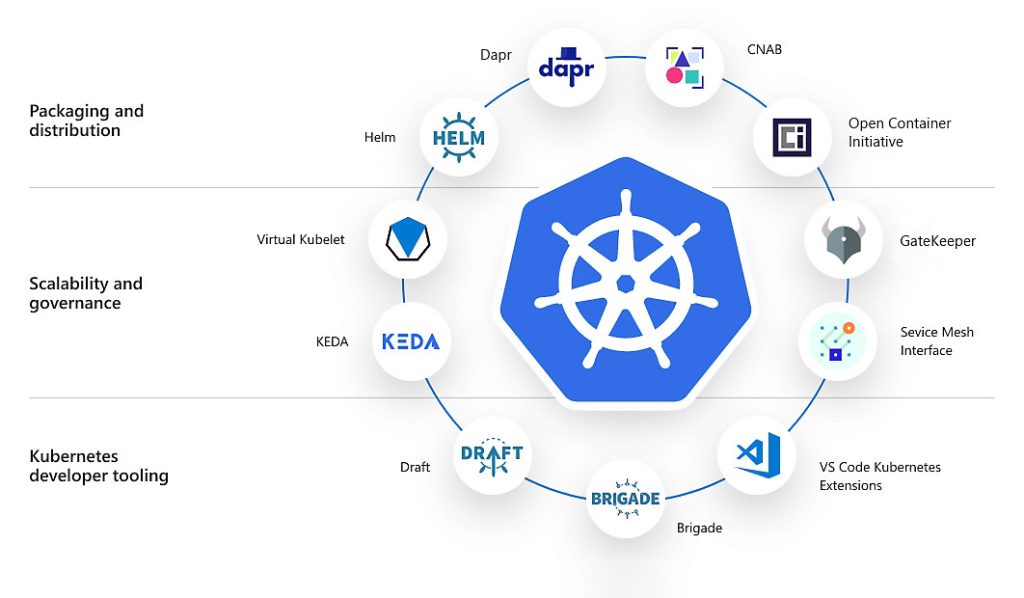
    XKubernetes is a portable, extensible, open source platform for managing containerized workloads and services, that facilitates both declarative configuration and automation. It has a large, rapidly growing ecosystem. Kubernetes services, support, and tools are widely available.

    Why you need Kubernetes and what it can do

    Containers are a good way to bundle and run your applications. In a production environment, you need to manage the containers that run the applications and ensure that there is no downtime. For example, if a container goes down, another container needs to start. Wouldn’t it be easier if this behavior was handled by a system?


    That’s how Kubernetes comes to the rescue! Kubernetes provides you with a framework to run distributed systems resiliently. It takes care of scaling and failover for your application, provides deployment patterns, and more. For example, Kubernetes can easily manage a canary deployment for your system.

    Kubernetes provides you with:

    • Service discovery and load balancing Kubernetes can expose a container using the DNS name or using their own IP address. If traffic to a container is high, Kubernetes is able to load balance and distribute the network traffic so that the deployment is stable.
    • Storage orchestration Kubernetes allows you to automatically mount a storage system of your choice, such as local storages, public cloud providers, and more.
    • Automated rollouts and rollbacks You can describe the desired state for your deployed containers using Kubernetes, and it can change the actual state to the desired state at a controlled rate. For example, you can automate Kubernetes to create new containers for your deployment, remove existing containers and adopt all their resources to the new container.
    • Automatic bin packing You provide Kubernetes with a cluster of nodes that it can use to run containerized tasks. You tell Kubernetes how much CPU and memory (RAM) each container needs. Kubernetes can fit containers onto your nodes to make the best use of your resources.
    • Self-healing Kubernetes restarts containers that fail, replaces containers, kills containers that don’t respond to your user-defined health check, and doesn’t advertise them to clients until they are ready to serve.
    • Secret and configuration management Kubernetes lets you store and manage sensitive information, such as passwords, OAuth tokens, and SSH keys. You can deploy and update secrets and application configuration without rebuilding your container images, and without exposing secrets in your stack configuration.

    Kubernetes Components

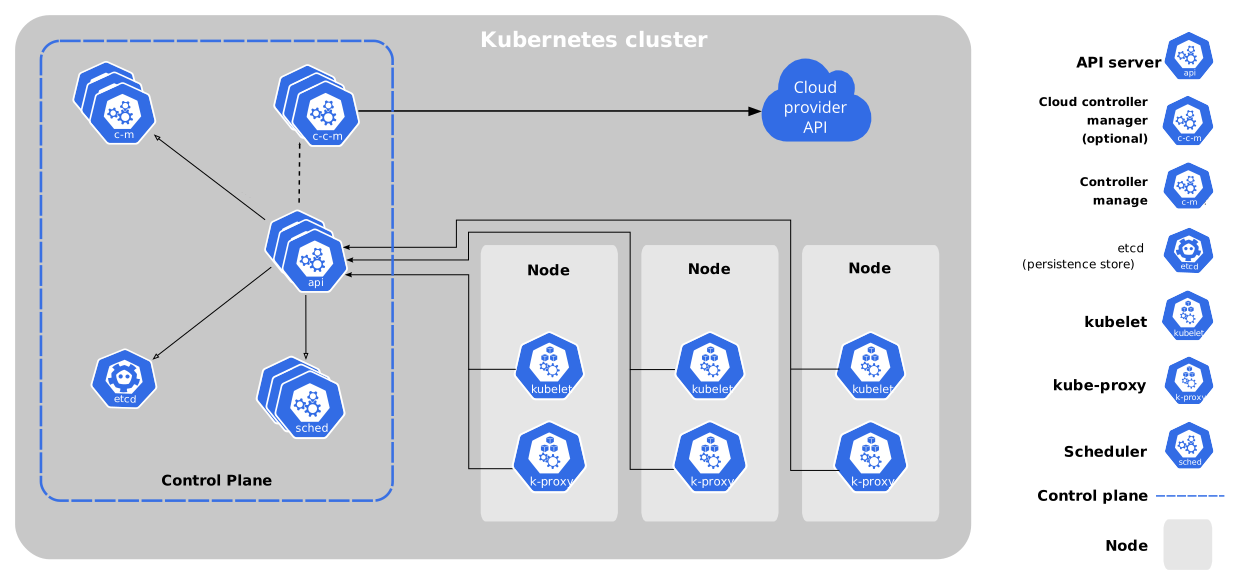
    When you deploy Kubernetes, you get a cluster.
    A Kubernetes cluster consists of a set of worker machines, called nodes, that run containerized applications. Every cluster has at least one worker node.
    The worker node(s) host the pods that are the components of the application workload. The control plane manages the worker nodes and the Pods in the cluster. In production environments, the control plane usually runs across multiple computers and a cluster usually runs multiple nodes, providing fault-tolerance and high availability.
    This document outlines the various components you need to have for a complete and working Kubernetes cluster.

    Advantages of Kubernetes:

    Scalability: Kubernetes allows developers to easily scale their applications up or down as demand fluctuates. The platform automatically monitors the health of each component of the application and can dynamically adjust the number of instances running based on the demand. One of the biggest advantages of Kubernetes is its ability to scale applications horizontally. Kubernetes can automatically scale the number of application instances based on the demand, making it an ideal platform for handling sudden spikes in traffic. This makes it easy to ensure that the application remains available and responsive to users.

    Resource efficiency: Kubernetes helps optimize the use of resources by scheduling containers to run on the most appropriate node based on their resource requirements. This ensures that resources are used efficiently, reducing the cost of running the application. Kubernetes can help organizations optimize resource utilization by intelligently scheduling and managing containers across nodes. This ensures that resources are used efficiently and reduces infrastructure costs.

    High availability: Kubernetes provides mechanisms for ensuring that applications are always available. For example, it can automatically restart containers that fail, and it can schedule replicas of containers across different nodes to ensure that the application can survive node failures. Kubernetes provides built-in features for ensuring high availability of applications. It automatically restarts failed containers, moves them to other nodes, and schedules them to run on healthy nodes. This ensures that the application is always available to users, even in the event of hardware failures.

    Portability: Kubernetes provides a consistent deployment platform across different environments, whether it is on-premises or in the cloud. This makes it easier for developers to deploy their applications in a variety of environments without having to modify their code. Kubernetes is designed to be cloud-agnostic, which means that it can run on any cloud provider or on-premises infrastructure. This allows organizations to avoid vendor lock-in and choose the platform that best meets their needs

    Self-healing: Kubernetes can detect and respond to failures in the application by automatically restarting containers, rolling back deployments, and rescheduling workloads. Kubernetes is designed to be self-healing. If a container crashes or becomes unresponsive, Kubernetes automatically detects the failure and restarts the container. This ensures that the application remains available and minimizes downtime.

    Service discovery and load balancing: Kubernetes provides a built-in service discovery and load balancing mechanism, which allows developers to easily expose their application services and manage traffic between them.

    Extensibility: Kubernetes is highly extensible, allowing developers to integrate it with other tools and services. This makes it easy to add new features and functionality to the deployment pipeline

    Open-source: Kubernetes is open-source, meaning that it is free to use and has a large community of developers contributing to its development. This results in a platform that is constantly evolving and improving.

    Fault tolerance: Kubernetes provides robust fault tolerance features, such as automatic failover and self-healing. It can detect when a container is unhealthy and automatically replace it with a new one. This ensures that the application remains operational and minimizes downtime.

    Portability: Kubernetes is designed to be cloud-agnostic, which means that it can run on any cloud provider or on-premises infrastructure. This allows organizations to avoid vendor lock-in and choose the platform that best meets their needs.

    Flexibility: Kubernetes provides a high degree of flexibility in how applications are deployed and managed. It allows organizations to define their own deployment strategies, such as rolling updates, blue-green deployments, and canary releases. This enables teams to iterate quickly and deploy new features with minimal disruption to the end-users.

    Disadvantages of Kubernetes:

    Complexity: Kubernetes can be complex to set up and manage, particularly for small teams or organizations with limited resources. It requires a significant amount of configuration and expertise to properly set up and maintain. Kubernetes is a complex platform, and it can be challenging to set up and manage. It requires a high level of expertise in containerization, networking, and distributed systems. This can make it difficult for organizations to get started with Kubernetes and maintain it over time.

    Learning curve: Developers and operations teams need to learn how to use Kubernetes effectively. This can take time and effort, particularly for those who are new to containerization and orchestration. Kubernetes has a steep learning curve, especially for developers who are new to containerization and distributed systems. It requires a deepunderstanding of Kubernetes concepts, such as pods, nodes, services, and controllers. This can slow down development and deployment processes.

    Performance overhead: Kubernetes introduces some overhead in terms of CPU and memory usage, which can impact application performance. While this is usually negligible, it can become a concern in large-scale deployments. Kubernetes introduces additional overhead, such as networking, load balancing, and service discovery. This can add latency to the application and reduce performance.

    Security: Kubernetes has a complex security model, and it is important to properly configure and secure the platform to ensure that applications are protected against potential security threats. Kubernetes introduces additional security considerations, such as securing the Kubernetes API server and ensuring that containers are running with the appropriate permissions. This requires a high level of expertise in Kubernetes security best practices.

    Dependency on external services: Kubernetes relies on external services such as container registries, network storage providers, and load balancers. This introduces dependencies that need to be managed and can impact the overall reliability of the application.
    Incompatibility with some legacy applications: Kubernetes may not be compatible with some legacy applications that are not designed to run in a containerized environment. This can make it difficult to migrate some applications to Kubernetes.

    Infrastructure requirements: Kubernetes requires a robust and reliable infrastructure to run on. This includes a suitable number of nodes with sufficient resources, reliable networking, and a persistent storage layer. Kubernetes requires significant resources, such as memory, CPU, and storage. It can be expensive to run on low-end hardware, and it requires a large amount of infrastructure to run at scale.

    Lack of maturity: Kubernetes is a relatively new technology, and it is still evolving rapidly. This can make it difficult for organizations to keep up with the latest features and best practices. Additionally, Kubernetes can be prone to bugs and performance issues, especially with complex deployments.

    Complexity of networking: Kubernetes provides a highly flexible and configurable networking model, but this can also make networking more complex. Setting up networking in Kubernetes requires a deep understanding of networking concepts, such as service meshes, load balancers, and network policies.

    Conclusion:

    Kubernetes is an excellent containerized application management solution that provides scalability, high availability, and automation. Although it comes with some complexity and a steep learning curve, the benefits generally outweigh the cons for organizations that want to develop resilient and effective systems. With the adoption of Kubernetes, businesses will be able to modernize their infrastructures, ease the deployment processes, and achieve uniform performance standards across varied environments. This will also free up teams to concentrate more on innovation rather than infrastructure management.

  • A Beginner’s Guide to CI/CD Pipelines: Benefits, Best Practices and Tools

    A Beginner’s Guide to CI/CD Pipelines: Benefits, Best Practices and Tools

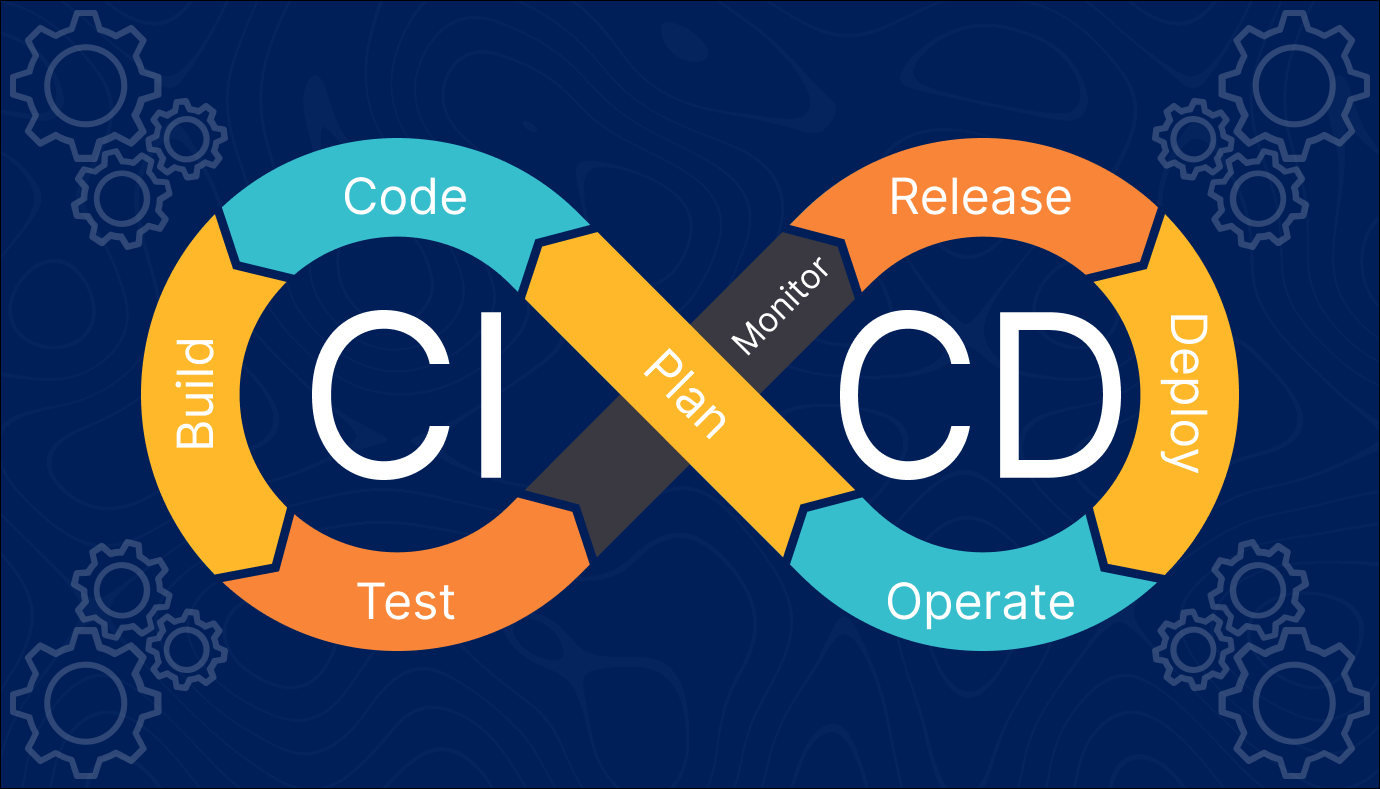
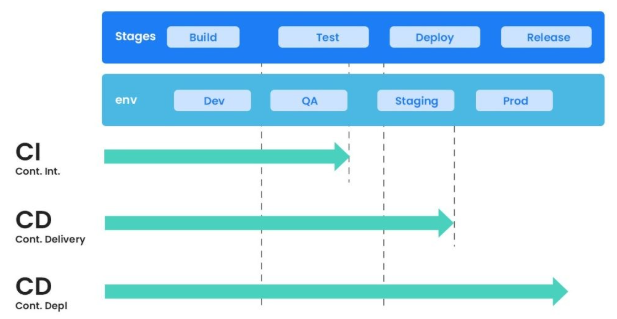
    The CI/CD pipeline introduces automation and continuous monitoring throughout the lifecycle of a software product. It involves the integration and testing phases to delivery and deployment. These connected practices are referred to as the CI/CD pipeline.

    Continuous integration is a software development method where members of the team can integrate their work at least once a day. In this method, every integration is checked by an automated build to search for the error.
    Continuous delivery is a software engineering method in which a team develops software products in a short cycle. It ensures that software can be easily released at any time.

    Continuous deployment is a software engineering process in which product functionalities are delivered using automatic deployment. It helps testers to validate whether the codebase changes are correct and it is stable or not.

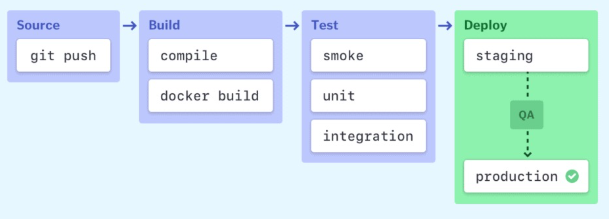
    Stages of a CI/CD pipeline

    CI/CD pipeline Best Practices

    Here is a CI/CD pipeline best practices:

    • Write up the current development process therefore, you can know the procedures that require to change and one that can be easily automated.
    • Start off with a small proof of project before going ahead and complete whole development process at once.
    • Set up a pipeline with more than one stage in which fast fundamental tests run first.
    • Start each workflow from the same, clean, and isolated environment.
    • Run open source tools that cover everything from code style to security scanning.
    • Setup a better code hub to continuously check the quality of your code by running the standard set of tests against every branch.
    • Peer code review each pull request to solve a problem in a collaborative manner.
    • You have to define success metrics before you start the transition to CD automation. This will help you to consistently analyze your software, developing progress and helping refine where needed.

    Advantages of CI/CD pipelines

    Here are the benefits of CI/CD Pipeline:

    • Builds and testing can be easily performed manually.
    • It can improve the consistency and quality of code.
    • Improves flexibility and has the ability to ship new functionalities.
    • CI/CD pipeline can streamline communication.
    • It can automate the process of software delivery.
    • Helps you to achieve faster customer feedback.
    • CI/CD pipeline helps you to increase your product visibility.
    • It enables you to remove manual errors.
    • Reduces costs and labour.
    • CI/CD pipelines can make the software development lifecycle faster.
    • It has automated pipeline deployment.
    • A CD pipeline gives a rapid feedback loop starting from developer to client.
    • Improves communications between organization employees.
    • It enables developers to know which changes in the build can turn to the brokerage and to avoid them in the future.
    • The automated tests, along with few manual test runs, help to fix any issues that may arise.

    Important CI/CD tools

    • Jenkins
    • Circle CI
    • Gitlab CI
    • Github Action
    • Bitbucket Pipeline
    • AWS Code Pipeline
    • Google Cloud Build
    • Bamboo

    Conclusion:

    CI/CD pipelines are transformational for development teams. Automating crucial processes reduces the effort required to generate, test, and release code, making the process go more smoothly and quickly. With fewer manual errors and faster feedback, teams can concentrate more on innovation and less on firefighting. CI/CD helps your team stay in sync, maintain high quality, and provide value to users more confidently and consistently, regardless of the size of the project—from minor updates to major releases.