Tag: Automation

  • Scaling AI in Enterprises: From Prototype to Production in 2026

    Scaling AI in Enterprises: From Prototype to Production in 2026

    AI projects can be small. We generate an idea in a team. Can we predict customer churn? Can we detect fraud? Can we improve delivery routes? We build a quick prototype (proof-of-concept) that shows promise.

    But the real challenge is not building that first model. The real issue is to make it something dependable, trusted and used every day throughout the entire organization. It is on the path between idea and production at scale that the real worth of AI opens up.

    From Idea to Real Business Value

    A prototype will only demonstrate what can be done. Production AI proves what’s valuable. To move forward, organizations must show that the system can help in real-world use cases.

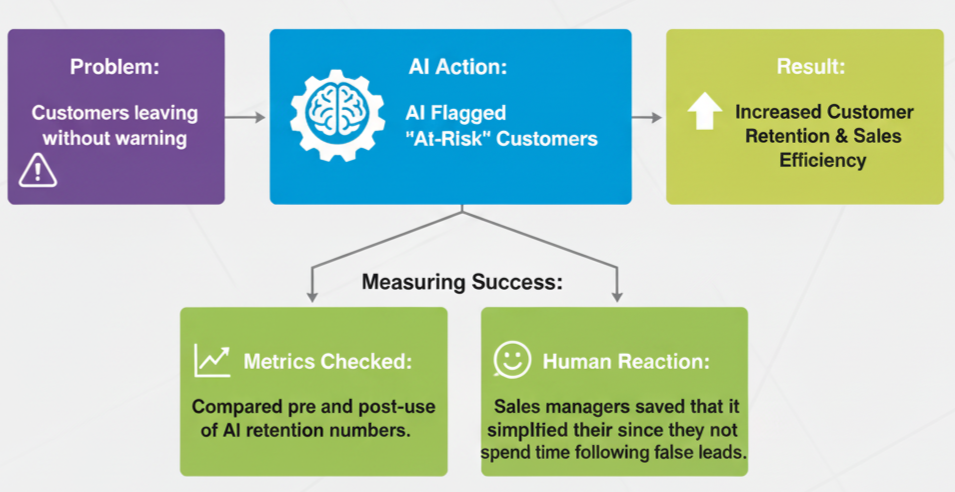
    Take a retail company. Their prototype AI identified customers to target based on their purchase history. Precision was fine, but managers inquired: “So is this actually helping us to save customers?” In order to determine, the AI was connected to their CRM, thereby enabling their sales teams to receive real-time notifications. In the near future, there was an increase in the number of reps, who targeted the right customers and retention.

    👉 Lesson: It does not matter how accurate you are. When connected to the day-to-day business operations, value will ensue when AI is involved.

    Real-World Scenarios of Scaling AI

    Here’s how different industries moved from prototypes to production systems:

    1. Retail: Keeping Customers from Leaving

    Retail: Keeping Customers from Leaving

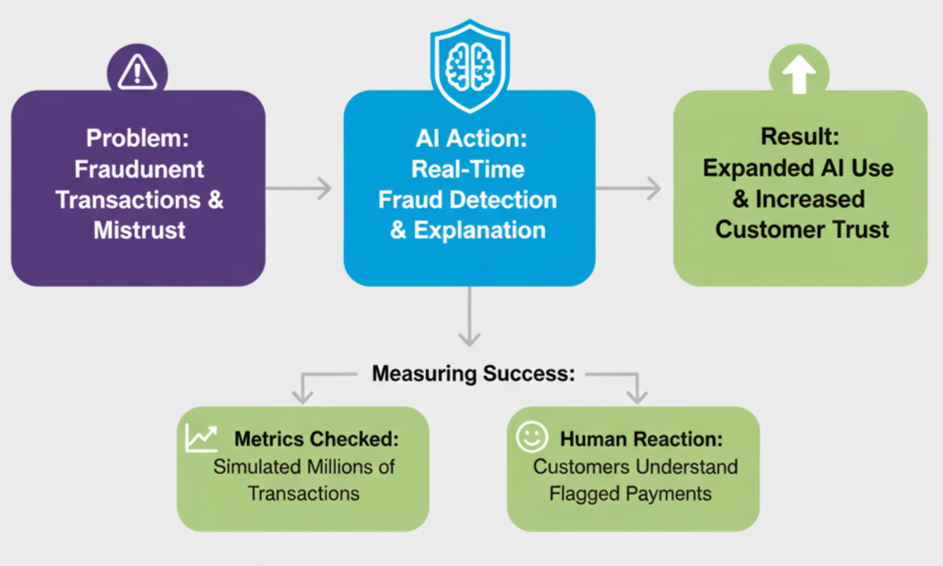
    2. Banking: Catching Fraud in Real Time

    Banking: Catching Fraud in Real Time

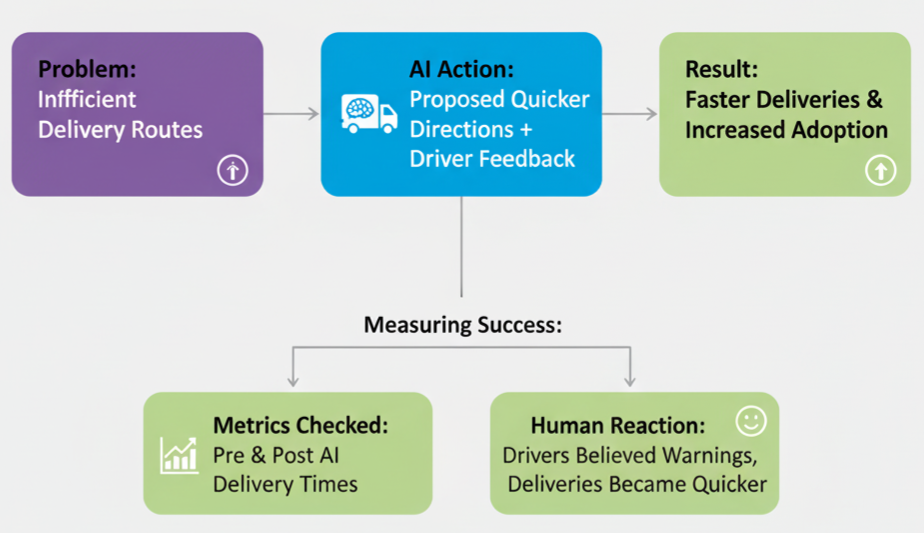
    3. Logistics: Smarter Delivery Routes

    Logistics: Smarter Delivery Routes

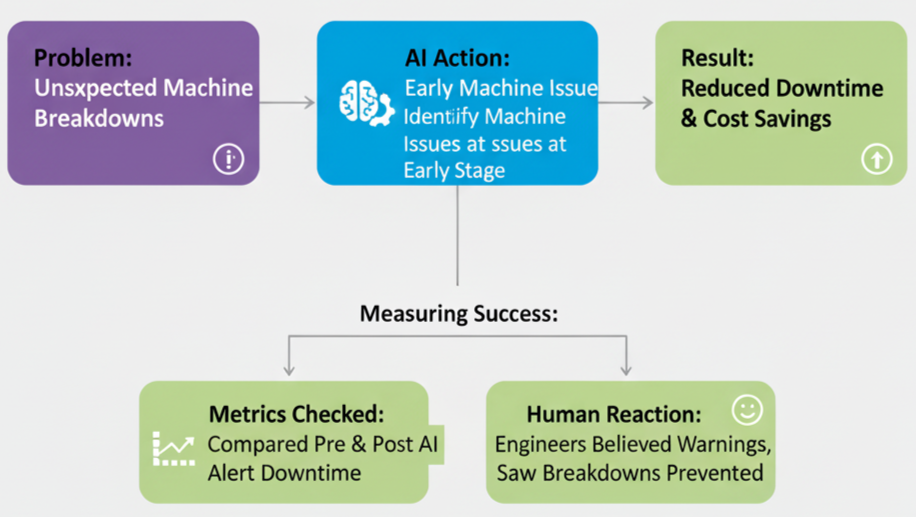
    4. Manufacturing: Preventing Machine Breakdowns

    Manufacturing: Preventing Machine Breakdowns

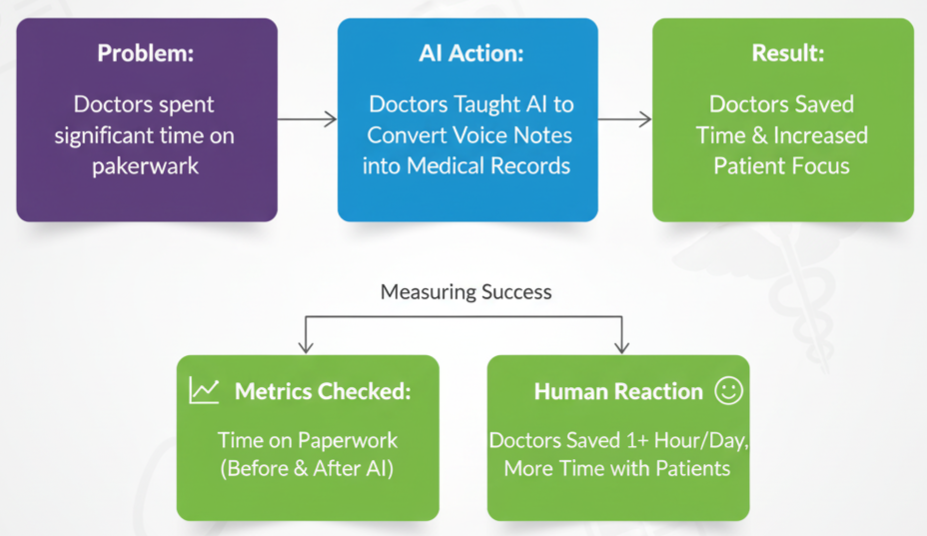
    5. Healthcare: Saving Doctors’ Time

    Healthcare: Saving Doctors’ Time

    Common Challenges in Scaling AI

    It is not merely about technology when scaling AI. Procedures and individuals are also important. Some common hurdles include:

    • Handling scale: Can the system process millions of records reliably?
    • Data security & compliance: Does it comply with legislation such as GDPR or HIPAA?
    • Trust & clarity: Does AI justify a decision?
    • Team adoption: Do the employees consider AI a tool of support and not danger?

    👉 Example: A shipping firm noticed drivers who opposed AI pathways. Their feedback was then added and adoption increased, and delivery was quicker.

    Key Takeaways

    • A prototype shows what’s possible.
    • Production AI shows what’s valuable.
    • Scaling ensures the whole organization benefits.
    • Accuracy is as important as user trust, good communication, and feedback loops.

    Final Thought: It is not the number of prototypes that the company builds that makes it the real winner of AI. They transform a working idea into a consistent system that the business applies, making a real difference in performance, cost reduction, and customer satisfaction.

    Ready to scale your AI projects beyond prototypes? Ellocent Labs’ expert team can help your enterprise deploy dependable AI solutions that generate real value. Contact us today to start your AI transformation journey.

  • Revolutionizing SaaS Scalability: Automating Multi-Client Onboarding Solution With a Single Codebase

    Revolutionizing SaaS Scalability: Automating Multi-Client Onboarding Solution With a Single Codebase

    Managing a multi-client SaaS application can be challenging, especially when onboarding new businesses involves repetitive manual tasks like setting up custom domains, configuring Amazon Cognito user pools, creating email templates, and provisioning storage. As the number of clients grows, this manual process becomes time-consuming, error-prone, and difficult to scale.

    To streamline and simplify the onboarding process, we offer a powerful solution. By leveraging CloudFormation templates, you can dynamically automate the setup of resources required for each new business, ensuring consistency, reducing manual effort, and accelerating client onboarding.

    Let’s explore how to create reusable templates that make your SaaS platform scalable, efficient, and future-ready.

    Challenges Faced in Traditional SaaS Client Onboarding

    Onboarding new clients to a SaaS platform is often a manual and error-prone process that can create significant challenges. Companies encounter these hurdles during traditional client onboarding:

    Time-Consuming Setup: Each new client requires custom configurations for domains, user pools, email templates, and storage. These tasks are repetitive and time-consuming, especially as the number of clients increases, leading to delays and operational bottlenecks. Clients expect quick setup times and fast time-to-value. Manual onboarding processes slow down the process, delaying the point at which clients can start using the service effectively. This can lead to dissatisfaction and a higher churn rate.

    Manual Configuration Errors: The more manual steps involved in onboarding, the greater the chance of mistakes. Variations in setup lead to unpredictable behavior, making it difficult to troubleshoot and maintain a consistent service level.

    Inconsistent Client Experiences: Without an automated process, each client onboarding can vary in terms of configurations and settings. This lack of consistency can lead to unpredictable behavior, challenges in troubleshooting, and difficulties in scaling the platform effectively.

    Scalability Issues: As the number of clients grows, managing manual onboarding becomes increasingly difficult. It becomes harder to ensure that each new client receives the necessary resources in a consistent and efficient manner, leading to slower growth and higher operational costs.

    Resource Management Challenges: Allocating and managing resources like storage and Cognito user pools can become overwhelming as the client base grows. Ensuring each client gets the correct allocation of resources.

    Our Innovative Solution: Automating Client Onboarding with One Click

    Our solution streamlines the entire client onboarding process by automating tasks like domain configuration, Amazon Cognito user pool setup, email template creation, and storage provisioning—all with a single click. This eliminates manual effort, reduces errors, and ensures consistency across all clients, leading to faster and more reliable onboarding.

    With automation in place, resource allocation is optimized, ensuring each client receives the correct resources without over-provisioning or under-provisioning. This solution also enhances scalability, allowing your platform to grow effortlessly without delays. By securely provisioning client data and ensuring compliance, we address security concerns and reduce risks, enabling clients to get up and running quickly with minimal friction and maximum efficiency.

    Our Approach to Success:

    To bring our innovative solution to life, we focused on creating a streamlined and automated onboarding process that could handle every aspect of client setup efficiently. Here’s how we achieved it:

    Centralized Automation Platform:

    We developed a centralized platform that integrates all necessary services like custom domain management, Cognito user pool configurations, email template creation, and storage provisioning. This platform ensures that every client’s resources are set up automatically and consistently with minimal manual intervention.

    Predefined Templates for Resource Allocation:

    We have designed reusable templates that define the configurations for each client’s domain, user pool, and storage. These templates are automatically applied during the onboarding process, ensuring that every client receives a consistent, high-quality setup. Once the domain and Cognito user pool are successfully created using the templates on the server, we store the Cognito details and domain configurations in the database for each business subscription.

    Efficient Multi-Client Database Management:

    By managing multiple clients within a single database, we can streamline data handling, improve performance, and reduce operational overhead. This solution leverages advanced data partitioning and access control techniques to isolate each client’s data, ensuring security and preventing cross-client data access. As a result, clients enjoy the benefits of a dedicated database experience without the complexity and cost of maintaining separate databases for each one.

    Security and Compliance Best Practices:

    Security was a top priority in our solution. We implemented automated access controls and resource isolation for each client, ensuring that their data is secure and compliant with industry standards. This automated setup reduces the risks associated with manual configurations and ensures that security is maintained consistently.

    User-Friendly Interface:

    We designed an intuitive, user-friendly interface that allows platform administrators to trigger the entire onboarding process with a single click. The interface provides transparency, showing the status of the setup and any required actions, making it easy for administrators to track and manage the onboarding process.

    By combining automation, scalability, and security, we created a solution that addresses the key challenges of traditional onboarding, reducing manual effort, increasing efficiency, and ensuring a consistent, secure client experience.

    Conclusion

    By automating the onboarding process, we’ve helped SaaS businesses:

    • Reduce time-to-market: Onboard new clients faster and get them up and running more quickly.
    • Improve client satisfaction: Deliver a consistent and reliable service experience.
    • Increase operational efficiency: Free up valuable resources for other critical tasks.
    • Gain a competitive edge: Scale your business with confidence and accelerate your growth.

    Ready to transform your SaaS business? Let’s innovate together!

  • A Beginner’s Guide to CI/CD Pipelines: Benefits, Best Practices and Tools

    A Beginner’s Guide to CI/CD Pipelines: Benefits, Best Practices and Tools

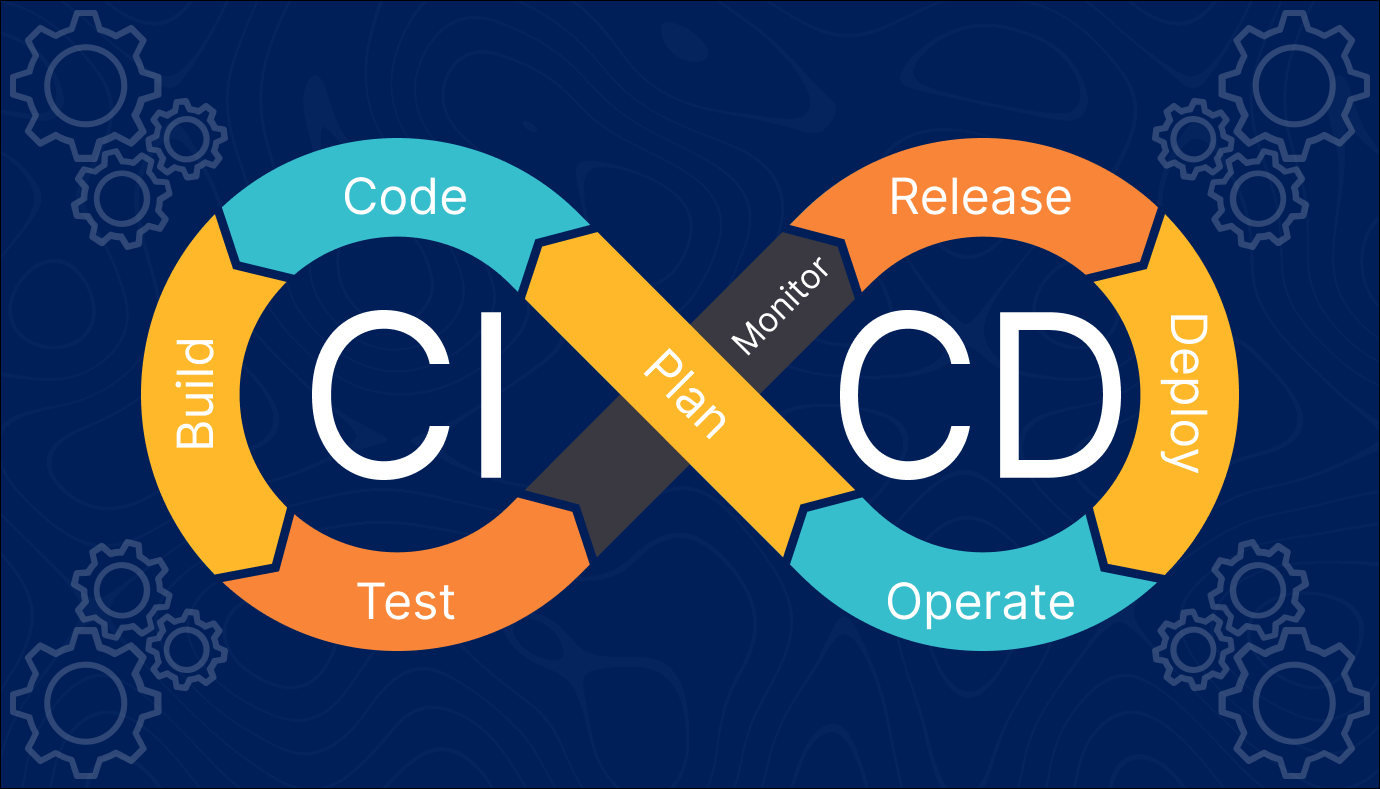
    The CI/CD pipeline introduces automation and continuous monitoring throughout the lifecycle of a software product. It involves the integration and testing phases to delivery and deployment. These connected practices are referred to as the CI/CD pipeline.

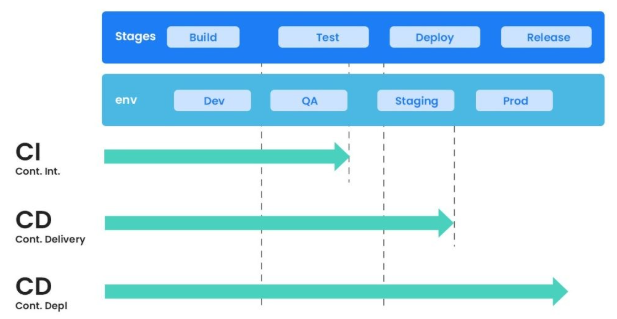
    Continuous integration is a software development method where members of the team can integrate their work at least once a day. In this method, every integration is checked by an automated build to search for the error.
    Continuous delivery is a software engineering method in which a team develops software products in a short cycle. It ensures that software can be easily released at any time.

    Continuous deployment is a software engineering process in which product functionalities are delivered using automatic deployment. It helps testers to validate whether the codebase changes are correct and it is stable or not.

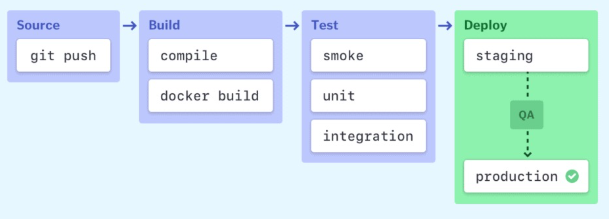
    Stages of a CI/CD pipeline

    CI/CD pipeline Best Practices

    Here is a CI/CD pipeline best practices:

    • Write up the current development process therefore, you can know the procedures that require to change and one that can be easily automated.
    • Start off with a small proof of project before going ahead and complete whole development process at once.
    • Set up a pipeline with more than one stage in which fast fundamental tests run first.
    • Start each workflow from the same, clean, and isolated environment.
    • Run open source tools that cover everything from code style to security scanning.
    • Setup a better code hub to continuously check the quality of your code by running the standard set of tests against every branch.
    • Peer code review each pull request to solve a problem in a collaborative manner.
    • You have to define success metrics before you start the transition to CD automation. This will help you to consistently analyze your software, developing progress and helping refine where needed.

    Advantages of CI/CD pipelines

    Here are the benefits of CI/CD Pipeline:

    • Builds and testing can be easily performed manually.
    • It can improve the consistency and quality of code.
    • Improves flexibility and has the ability to ship new functionalities.
    • CI/CD pipeline can streamline communication.
    • It can automate the process of software delivery.
    • Helps you to achieve faster customer feedback.
    • CI/CD pipeline helps you to increase your product visibility.
    • It enables you to remove manual errors.
    • Reduces costs and labour.
    • CI/CD pipelines can make the software development lifecycle faster.
    • It has automated pipeline deployment.
    • A CD pipeline gives a rapid feedback loop starting from developer to client.
    • Improves communications between organization employees.
    • It enables developers to know which changes in the build can turn to the brokerage and to avoid them in the future.
    • The automated tests, along with few manual test runs, help to fix any issues that may arise.

    Important CI/CD tools

    • Jenkins
    • Circle CI
    • Gitlab CI
    • Github Action
    • Bitbucket Pipeline
    • AWS Code Pipeline
    • Google Cloud Build
    • Bamboo

    Conclusion:

    CI/CD pipelines are transformational for development teams. Automating crucial processes reduces the effort required to generate, test, and release code, making the process go more smoothly and quickly. With fewer manual errors and faster feedback, teams can concentrate more on innovation and less on firefighting. CI/CD helps your team stay in sync, maintain high quality, and provide value to users more confidently and consistently, regardless of the size of the project—from minor updates to major releases.